Blog
The Ultimate Gaming Mouse Checklist: How to Choose the Perfect Peripheral in 2026

Is your AED 500 peripheral actually the reason you’re missing those critical headshots in Valorant? You already know that a top-tier PC build means nothing if your hand feels like lead after just two hours of play. It’s a common struggle for gamers across the UAE who face frustrating input lag or get lost in a sea of marketing jargon about optical switches and polling rates. You want gear that works as hard as you do without overspending on features you’ll never use, and finding the right mouse is the first step to a better K/D ratio.
This expert-led checklist ensures you master the technical specs and ergonomic essentials of your next peripheral. We’ve cut through the noise to help you understand the real difference between budget sensors and enthusiast-grade hardware. By the end of this guide, you’ll have a clear list of features to check before you buy, ensuring your new gear perfectly matches your rig and your playstyle. Get ready to play like the pros with a setup that actually fits your grip and your budget.
Key Takeaways
- Learn how to identify elite sensors and switches so your mouse performs like a pro engine in every match.
- Find your ideal grip and hump height to ensure maximum comfort and long-term wrist health for marathon gaming sessions.
- Compare 2.4GHz and Bluetooth technology to eliminate lag and maximize battery life for your wireless setup.
- Master onboard memory and software settings to keep your custom profiles ready for any local UAE LAN tournament.
- Apply the “Budget King” strategy to pair high-performance peripherals with your PC build for the ultimate value.
The Hardware Core: A Sensor and Switch Checklist
Don’t let a 50 AED office peripheral hold back your K/D ratio. Competitive gaming in 2026 demands hardware that reacts as fast as your reflexes. A standard office mouse fails because it uses low-grade sensors that spin out during fast movements. It lacks the polling rate needed for smooth tracking on high-refresh monitors. To play like the pros, you need a dedicated gaming engine under the hood.
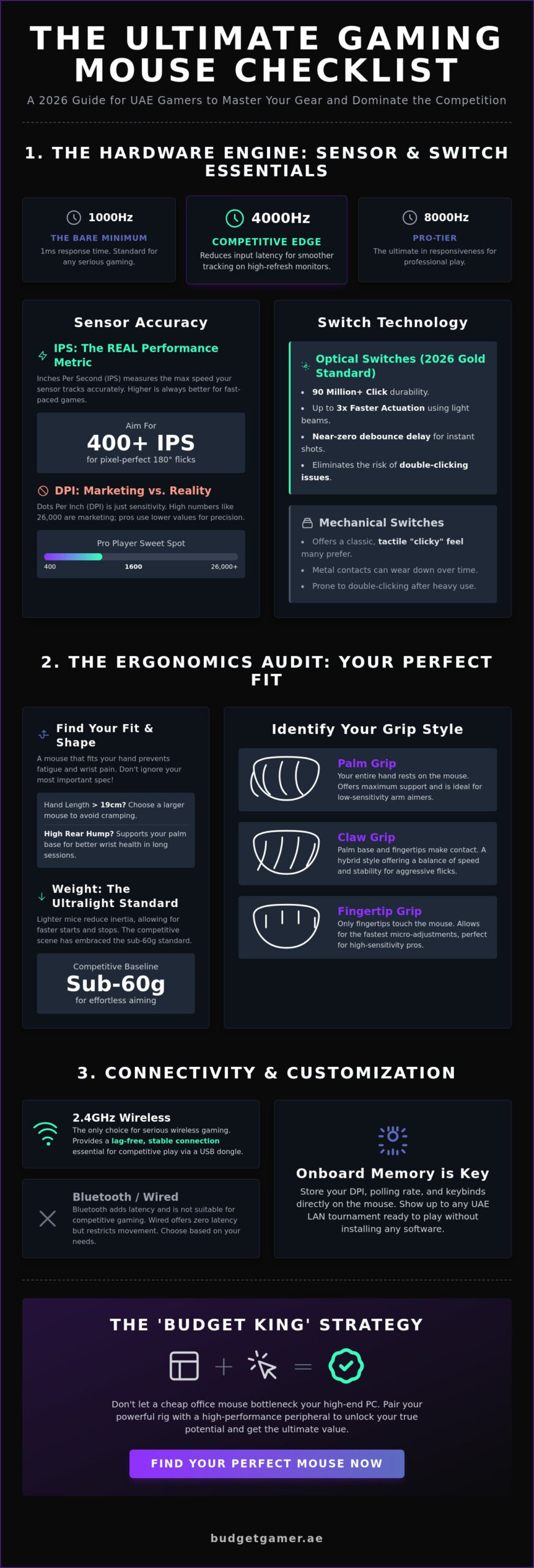
The optical sensor is the heart of your peripheral. It acts as a high-speed camera, taking thousands of images of your surface every second to calculate movement. While looking at Computer Mouse History shows we have come a long way from physical trackballs, the modern optical sensor is more precise than ever. In 2026, a 1000Hz polling rate is the absolute bare minimum. This ensures your device reports its position to your PC every 1 millisecond. If you want a competitive edge in Dubai’s local tournaments, look for 4000Hz or 8000Hz models to reduce input latency even further.
Sensor Accuracy: DPI vs. IPS
DPI stands for Dots Per Inch. It measures how far your cursor moves on the screen relative to one inch of physical movement. High DPI numbers like 26,000 are common marketing tactics, but they don’t mean better quality. Most professional esports athletes stay within the 400 to 1600 DPI range for maximum control.
IPS, or Inches Per Second, is the spec that actually matters for performance. This represents the maximum speed the sensor can track before it loses accuracy. A sensor with 400 IPS can handle rapid swipes across your mouse pad without skipping a beat. Don’t fall for the myth that higher DPI equals better skill; focus on a high IPS rating to ensure your 180-degree turns stay pixel-perfect.
Switch Longevity and Click Feel
Your switches determine how every click feels and how long the device lasts. Mechanical switches use metal contacts, which can wear down and cause the dreaded double-click issue. Optical switches are the 2026 gold standard. They use a beam of light to register clicks, making them up to 3 times faster than traditional mechanical options.
- Optical Switches: No physical contact means they often last for 90 million clicks.
- Mechanical Switches: Offer a classic, tactile “clicky” feel that many gamers prefer for timing.
- Tactile Feedback: This physical sensation helps you confirm an action without looking, which is vital for high-stakes clutch moments.
Debounce delay is the time between a physical click and signal registration. By using optical technology, you can drop this delay to near zero. This ensures your shots fire the exact millisecond you press the button. Get the right hardware now and start winning more games today.
The Ergonomics Audit: Finding Your Perfect Grip
Hand size is the single most ignored metric in the UAE gaming market. Most gamers buy based on RGB lighting or brand hype, but a mouse that doesn’t fit your hand leads to fatigue; or worse, long term wrist pain. If your hand measures over 19cm in length, a small shell will cause your fingers to cramp during intense 1v1 situations. The height of the mouse hump also dictates your wrist health. A high rear hump supports the base of your palm, which reduces the extension of your wrist. This is vital for gamers in Dubai spending 6 plus hours in competitive lobbies. You should choose an ergonomic shape if you want a natural right-handed tilt, while ambidextrous shapes offer a neutral feel for flick-heavy playstyles.
Texture matters when the heat is on. In the humid UAE climate, a glossy coating becomes a slippery mess after thirty minutes of play. Matte finishes provide better friction for dry or slightly sweaty hands. If you struggle with grip, look for devices featuring textured side grips or high-performance coating technology. Understanding these basics of Gaming Mouse Hardware ensures you don’t waste your AED on a peripheral that hurts to use. Stick to shapes that complement your natural hand position rather than forcing a new one.
Identifying Your Grip Style
- Palm Grip: Your entire hand rests on the shell. It offers maximum support for low-sensitivity players who track targets across large mousepads with their arm.
- Claw Grip: Only your palm base and fingertips touch the device. It’s the hybrid choice for fast clicking and aggressive flick shots in tactical shooters like Valorant.
- Fingertip Grip: Your palm doesn’t touch the shell at all. This style allows for the fastest micro-adjustments, making it perfect for high-sensitivity pros who aim with their fingers.
Weight Management: The Ultralight Trend
In 2026, the competitive UAE scene has moved toward the ultralight standard. Sub-60g units are now the baseline for professional play. These lightweight shells reduce the inertia required to start and stop a movement, giving you a millisecond advantage. While ‘honeycomb’ perforated shells were popular for years to shed grams, modern engineering now allows for solid, hole-free shells that remain under 55g. Weight-adjustable peripherals have become a niche product; they’re mostly used by players who prefer a 90g plus feel. Most modern pros have ditched the extra weights to Play Like The Pros with faster, more reactive gear. You can find budget-friendly gear that hits these professional weight targets without the premium price tag.
Connectivity Checklist: Wired vs. Wireless Performance
By 2026, the performance gap between wired and wireless peripherals has effectively vanished. Modern 2.4GHz wireless protocols now deliver 1ms response times that rival any physical connection. You get the freedom to flick your mouse across the desk without a cable dragging behind. Professional players in the UAE have almost entirely shifted to wireless setups for this reason. Battery life is no longer a major hurdle either. Expect high-performance models to last between 80 and 150 hours on a single charge. If you do run low, USB-C is the mandatory standard for fast charging. A quick 10-minute top-up can provide five hours of gameplay. Some elite setups even use wireless charging pads to keep the battery at 100% indefinitely.
Cable technology has also evolved for those who prefer the classic route. The “Paracord” revolution changed everything for wired enthusiasts. These cables use a loose, flexible weave that feels weightless. They don’t kink or hold memory like the stiff rubber or heavy braided cables of the past. It’s a massive win for gamers who want the security of a wire without the physical resistance.
Wireless Stability in High-Interference Areas
Gaming in high-density areas like Downtown Dubai or Dubai Marina presents unique challenges. Your 2.4GHz signal competes with dozens of Wi-Fi routers and smart home devices. This is why 2.4GHz dongles are superior to Bluetooth for gaming. Bluetooth is too prone to drops and lag in crowded environments. Always use the provided dongle extender to keep the receiver within 20cm of your mouse. This ensures a clean, uninterrupted path for the signal. Dual-mode mice are the expert choice here. Use Bluetooth for office work to save battery, then flip the switch to 2.4GHz when it’s time to Play Like The Pros.
Wired Reliability for Budget Setups
Wired mice remain the “best value” champions for beginners. You get elite sensor performance at a fraction of the cost of wireless flagships. It’s the most efficient way to maximize your value per dirham. Latency is the delay in milliseconds between your movement and the screen reaction. Wired connections offer the lowest possible latency with zero risk of signal interference. If you find the cable distracting, buy a dedicated mouse bungee for around 40 د.إ to 60 د.إ. This simple tool holds the cord in the air and eliminates drag. For more details on technical specs, check out this comprehensive guide on gaming mice to see how different connections impact your rank. Don’t let a bad connection hold you back. Pick the setup that fits your desk and start winning now.
Customization and Software: Beyond the Hardware
Your mouse hardware is only half the battle. To play like the pros, you need to master the digital and physical tweaks that separate a standard peripheral from a competitive tool. Onboard memory is the first must-have feature for any serious gamer in the UAE. It lets you save up to five custom profiles directly onto the device. This means you can head to a local LAN tournament in Dubai or a friend’s house and keep your exact DPI and polling rate settings without installing any software on their PC.
RGB lighting has evolved beyond simple aesthetics. In 2026, smart lighting serves as a functional battery and profile indicator. A quick flash of red might signal your battery is below 15 percent, while a blue glow confirms you’ve switched to your sniper profile. Don’t overcomplicate your layout with too many side buttons. Most FPS players thrive with two well-placed thumb buttons; adding more can lead to accidental clicks and extra weight. Competitive players also prioritize Lift-Off Distance (LOD). Keeping your LOD below 1.2mm ensures the sensor stops tracking the moment you lift your mouse to reset its position, preventing jittery crosshair movement.
Software Ecosystems and Bloatware
Major brands provide deep customization through suites like Razer Synapse or Logitech G Hub. These tools allow you to calibrate your sensor to specific surfaces and record complex macros. However, many professional players now prefer driverless mice. These devices use physical switches on the bottom to toggle DPI and polling rates. This eliminates “bloatware” that can eat up CPU cycles and cause input lag. If you choose a software-reliant mouse, set up distinct profiles for different genres. Use a high-DPI, multi-macro setup for MOBA titles and a low-DPI, raw-input configuration for tactical shooters like Valorant.
Mouse Feet and Gliding Surface
The material under your mouse determines your speed and control. Virgin-grade PTFE (Teflon) remains the standard for a smooth, consistent glide. If you want maximum speed, 2026 has seen a massive rise in aluminosilicate glass skates. These offer near-zero friction but require a high-quality cloth pad to stay controllable. Be aware that the high humidity in coastal UAE regions can make cloth pads feel “muddy.” Pair your skates with a hybrid or hard pad if you notice your glide slowing down.
- Check for wear: Inspect your mouse skates every six months for scratches or flattening.
- Clean the sensor: Use a puff of compressed air monthly to clear dust from the lens.
- Replace when needed: If the plastic bottom of the mouse touches the pad, your skates are too thin.
Ready to find a high-performance peripheral that fits your budget? Shop our expert-picked gaming mice now and dominate the leaderboard.
The ‘Budget King’ Strategy: Matching Mouse to PC
Your gaming setup is only as strong as its weakest link. Don’t bottleneck a high-speed rig with a sluggish peripheral. At Budget Gamer UAE, we believe your gear should scale alongside your hardware. If you’ve invested in a mid-range “Budget King” setup, pairing it with a value-driven performance mouse ensures every click registers instantly without overspending. You don’t need to drop 800 AED on a peripheral if your system targets 1080p gaming, but you do need a sensor that won’t spin out during a clutch moment.
High-end synergy is where the real magic happens. If you’re running an Ultra High-End PC with a 240Hz gaming monitor, you need a 4K polling rate. Standard 1,000Hz polling creates micro-stutter on high-refresh displays. Upgrading to a 4,000Hz or 8,000Hz mouse provides the smooth, 0.25ms response time that top-tier hardware demands. Our philosophy is simple: performance is a right, not a luxury. We help you find that perfect balance where every dirham spent translates directly into faster flick shots and better tracking.
Allocating Your Budget Wisely
Follow the 10% Rule for a balanced setup. If your total pc build uae costs 5,000 AED, aim to spend roughly 500 AED on your peripherals. This ensures your input device matches the processing power of your CPU and GPU. Focus your spending on the sensor and build quality rather than flashy RGB lighting. You can often save 100 AED just by choosing a “stealth” version of a flagship model. For a complete breakdown of how to balance every component in your station, the best gaming PC setup UAE guide for 2026 covers every performance tier from Budget King to Beast Gaming System.
- Splurge: Invest in a lightweight chassis and a flawless optical sensor.
- Save: Skip the wireless charging pads and excessive macro buttons if you only play FPS games.
- Refurbished: Certified refurbished peripherals are a hidden gem in the UAE. You can often find pro-tier models for 35% less than the original retail price, making elite gear accessible for tight budgets.
Play Like The Pros: The Final Verdict
The perfect 2026 gaming setup requires more than just raw horsepower. It needs a precise interface. Your checklist is now complete: prioritize a shape that fits your grip, a weight under 60 grams, and a polling rate that matches your monitor’s refresh rate. When these elements align, your peripheral becomes an extension of your arm. It completes the “Beast Gaming System” experience by removing the lag between your brain and the screen.
Don’t settle for mediocre gear that holds you back. Whether you’re climbing the ranks in Valorant or exploring open worlds, the right tools make the difference. Start your journey with a pro-tier setup today. Visit our shop, grab your gear, and Play Now!
Master Your 2026 Gaming Setup
Choosing the right mouse in 2026 requires more than just looking at a spec sheet. You need to prioritize optical switches that offer 0.2ms response times and ensure your grip style matches the peripheral’s weight distribution for maximum precision. High-performance wireless technology has now standardized 8,000Hz polling rates, meaning you get cord-free freedom without sacrificing a single millisecond of latency. Pairing these advanced tools with a balanced PC ensures your hardware never bottlenecks your skill during intense competitive matches.
Don’t let an outdated rig hold back your new gear. Our team at Budget Gamer UAE consists of trusted local hardware specialists ready to help you dominate. We offer expertly curated UAE gaming builds designed for peak performance and maximum value. Take advantage of our flexible payment options and Play Now, Pay Later with Tabby to get your equipment immediately with no hidden fees. Build your dream setup with the Budget King PC today!
Your journey to the top of the leaderboards starts with making the right hardware choices. Grab your gear, upgrade your station, and get ready to play like the pros.
Frequently Asked Questions
Is a wireless mouse as fast as a wired mouse for gaming?
Modern wireless technology matches wired performance with latency under 1ms. Top-tier wireless models now offer 4,000Hz or 8,000Hz polling rates, meaning your mouse sends data to your PC every 0.125 milliseconds. You get pro-level speed without any cable drag. It is the best way to play like the pros without spending extra on cable management accessories.
What is the best DPI setting for shooters like Valorant or CS2?
Most pro Valorant and CS2 players set their mouse between 400 and 800 DPI for maximum precision. Data from ProSettings shows that 97% of tactical shooter pros stay within this specific range. Lower DPI settings allow for larger arm movements, which helps you hit critical headshots in competitive Dubai lobbies. It’s a budget-friendly way to improve your aim instantly.
Do I really need a gaming mouse pad?
You absolutely need a gaming mouse pad to ensure consistent sensor tracking and protect your desk surface. A dedicated cloth or hybrid surface reduces friction by 30% compared to a standard wooden table. This consistency is vital for building muscle memory. It ensures your sensor doesn’t skip during intense matches, making it a high-value upgrade for any setup.
How long does a typical gaming mouse last before the switches fail?
A high-quality gaming mouse typically lasts between 50 million and 90 million clicks before the switches fail. Optical switches are the most durable, often reaching that 90 million mark without developing double-click issues. If you game for 4 hours daily, a 50 million click rating should last you over 10 years. It’s a powerful investment for long-term gaming performance.
What is the difference between an optical and laser mouse sensor?
Optical sensors use LED lights and are superior for gaming because they offer 1:1 tracking without jitter. Laser sensors can work on glass surfaces, but they often include 5% to 10% hardware acceleration that messes with your aim. Stick to optical sensors for the best value and accuracy. Most experts agree that optical technology is the gold standard for competitive play.
Can I use a gaming mouse for office work and productivity?
Gaming mice are incredible tools for office work and creative tasks due to their high precision. The extra programmable buttons can cut down on repetitive shortcuts, potentially saving you 15 minutes of work time every day. Their ergonomic shapes also reduce wrist strain during long sessions at the office in Downtown Dubai. You get top performance for both play and work.
How do I clean my gaming mouse without damaging the sensor?
Clean your device using a microfiber cloth lightly dampened with 70% isopropyl alcohol. Never spray liquid directly onto the sensor or into the gaps between the buttons. Use a dry Q-tip to gently remove dust from the sensor lens every 30 days to maintain peak tracking performance. Keeping your gear clean ensures it stays budget-friendly by lasting much longer.
Why do some mice have holes in them (honeycomb design)?
The honeycomb design exists purely to reduce the total weight of the device without sacrificing structural integrity. This construction allows manufacturers to create units that weigh less than 60 grams. Lighter gear means less fatigue during 6 hour gaming marathons and faster reaction times when you need to flick your aim. It’s a pro-level feature that helps you stay fast and agile.