Blog
Gaming Monitor Guide 2026: How to Choose the Best Screen in the UAE

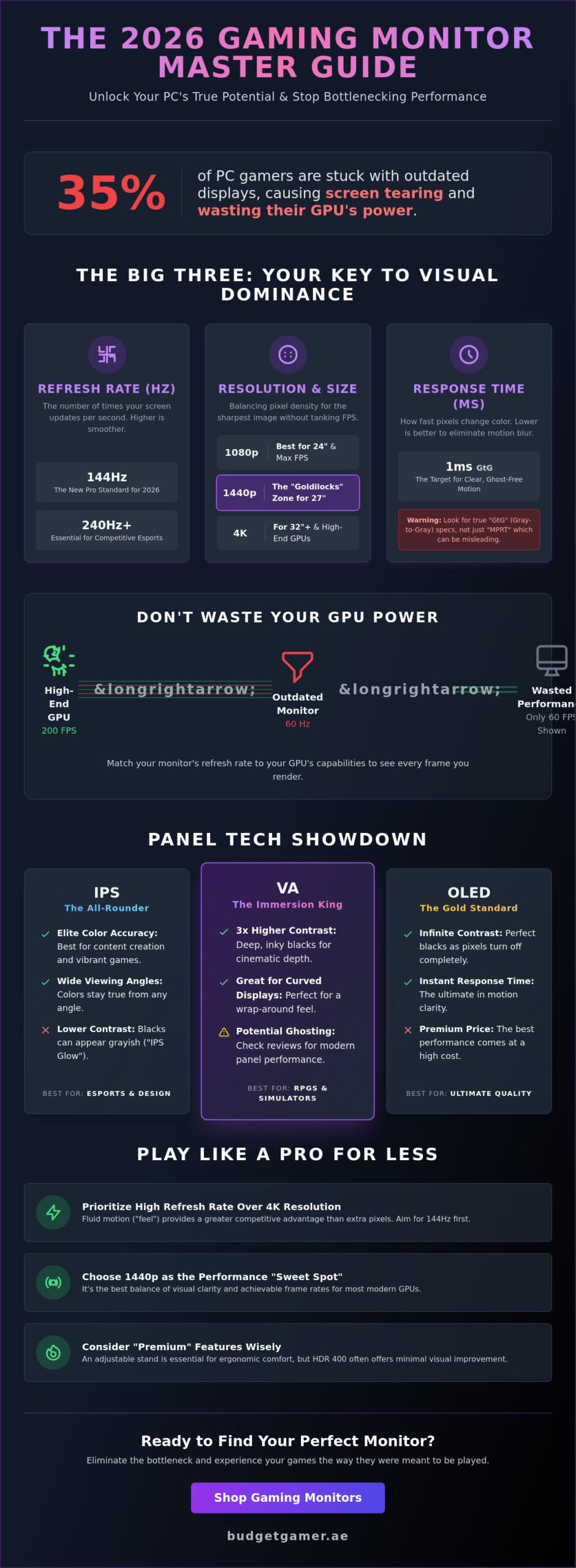
Your high-end graphics card is essentially a paperweight if your screen can’t display the frames it’s pushing. According to 2025 industry data, nearly 35% of PC users bottleneck their performance by using outdated displays that cause screen tearing and stuttering. You want those next-gen visuals and silky smooth motion, but technical jargon like G-Sync, IPS panels, and 1ms latency often makes the buying process feel like a chore. It’s frustrating to spend 2,500 AED on a 4K gaming monitor only to realize your current GPU can only handle 1080p at 60Hz.
You deserve a setup that matches your specific build and lets you play like the pros without overspending. This 2026 guide cuts through the marketing noise to help you master the technical specs that actually impact your performance. We’ll show you exactly how to balance resolution with refresh rates and how to pick the best value screen available in the UAE market today. Get ready to unlock your PC’s true potential and experience vibrant colors that bring your favorite titles to life.
Key Takeaways
- Discover why a 144Hz refresh rate is the new pro standard for 2026 and how to balance speed with resolution for the ultimate competitive edge.
- Master panel technology to choose between the elite color accuracy of IPS or the deep contrast of OLED based on your specific gaming style.
- Save your AED by matching your gaming monitor to your GPU power, ensuring you eliminate screen tearing without overspending on unnecessary 4K specs.
- Identify which “premium” features like HDR 400 or adjustable stands are essential for long sessions and which are just marketing hype.
- Unlock pro-level performance for fewer Dirhams by prioritizing high-speed “feel” over resolution and hunting for last year’s flagship bargains.
The Big Three: Refresh Rate, Resolution, and Response Time
Your gaming monitor is the most vital piece of your setup because it’s the only part you actually look at. Choosing the wrong screen bottlenecks your entire PC. In 2026, three specific metrics decide if you win or lose: Refresh Rate, Resolution, and Response Time. These specs dictate 90% of your visual experience. If you get these right, you’ll see enemies faster and react with better precision. If you get them wrong, even a 10,000 AED PC will feel sluggish.
The 144Hz standard is no longer a luxury. It’s the new baseline for gamers in the UAE. If you’re building a budget rig, don’t settle for anything less. Higher refresh rates provide the fluid motion needed to track enemies accurately. Combined with a low response time, these specs reduce input lag and motion blur. Most manufacturers claim 1ms speeds, but this often refers to specific settings that might cause visual artifacts. You need to look closer at core monitor technologies to ensure you’re getting true speed rather than just a marketing label.
Refresh Rate (Hz): The Secret to Fluid Motion
Refresh Rate is the number of times the image updates per second. It works hand-in-hand with your frames per second (FPS). If your GPU pumps out 200 FPS but your screen is capped at 60Hz, you’re missing 140 frames of data every second. It’s a total waste of hardware power. For competitive esports titles like Valorant or CS2, 240Hz is the current goal. It gives you a millisecond advantage that translates to faster reaction times. Play Like The Pros by matching your Hz to your game’s performance level.
Resolution vs. Screen Size: Finding the Sweet Spot
Pixel density is the secret to a sharp image. A 27-inch 1440p screen is the “Goldilocks” zone for UAE gamers because it balances clarity and performance. It looks significantly sharper than 1080p without requiring a massive investment in a top-tier GPU. Avoid 1080p on screens larger than 24 inches. At 27 or 32 inches, 1080p looks blurry because the pixels are stretched too thin. Use these tips to choose your resolution:
- 1080p: Best for 24-inch screens and maximum FPS in competitive shooters.
- 1440p: The ideal balance for 27-inch screens. High detail with manageable performance costs.
- 4K: Reserved for 32-inch screens or larger. It looks incredible but requires a high-end RTX card.
Remember our Play Now, Pay Later options if you’re stuck between a budget 1080p screen and a high-performance 1440p model. Investing in the right resolution now saves you from needing an upgrade next year. Don’t let a blurry screen ruin your immersion.
Panel Technology: IPS vs. VA vs. OLED
The panel type determines your entire visual experience. It dictates how colors pop, how deep the shadows look, and how fast the pixels shift. In 2026, choosing the right tech means balancing your budget against your favorite genres. Your choice affects everything from motion clarity to how much your eyes strain during a long session. You should consult Intel’s gaming monitor guide to see how these panel specs align with your specific GPU capabilities.
IPS: The All-Rounder for Work and Play
IPS (In-Plane Switching) remains the most popular choice for a gaming monitor in the UAE. These screens offer 178-degree viewing angles and the best color reproduction in the mid-range market. If you play Valorant or Counter-Strike, you need the consistent speed IPS provides. It’s the standard for anyone who also does video editing or graphic design on the side.
You must understand “IPS Glow” before buying. This is a slight light leakage visible in the corners when viewing dark scenes in a dim room. It’s a physical limitation of the tech. Most competitive players accept this trade-off for the 1ms or 0.5ms GtG response times found on modern units. It’s a reliable, high-performance choice that fits most desks.
VA and Curved Displays: Immersion Reimagined
VA (Vertical Alignment) panels are the kings of contrast. While IPS panels usually hit a 1000:1 contrast ratio, VA panels frequently reach 3000:1 or 4000:1. This makes blacks look truly black rather than dark grey. It’s the perfect tech for immersive RPGs or horror games where atmosphere is everything.
Most curved screens use VA tech because it handles the physics of a bend better than IPS. Older budget models suffered from “ghosting,” which is a faint trail behind moving objects. Modern 2026 VA panels have largely fixed this with advanced overdrive settings. These are ideal for:
- Racing simulators where peripheral immersion is key
- Cinematic single-player adventures with dark environments
- Gamers who want a curved 1500R or 1000R aesthetic for a wrap-around feel
OLED: The 2026 Gold Standard
OLED is no longer just for high-end TVs. In 2026, it represents the absolute peak of performance for a gaming monitor. Each pixel produces its own light. This results in infinite contrast and a 0.03ms response time that makes motion look perfectly clear. There’s no backlight, so there’s no glow or bleed.
Expect to pay a premium for this level of quality. Entry-level OLEDs in Dubai typically start around AED 2,900. They’re expensive because the manufacturing process for small-format high-refresh panels is complex. If you want to play like the pros and have the budget, OLED is the clear winner for pure visual fidelity. You can find expert-picked monitors
The Bottleneck Factor: Matching Your Monitor to Your PC Build
Buying a 4K gaming monitor when you’re running a budget GPU like an RTX 4060 or an older GTX card is a common mistake that kills your performance. You’ll end up with a blurry, stuttering mess because your hardware can’t push enough pixels to fill that high-resolution screen. If your PC struggles to hit 60 frames per second at 1080p, jumping to 4K will drop your gameplay into a slideshow. Always match your screen to your PC’s actual power to get the best value for your AED. Building the best gaming PC setup in the UAE means treating your monitor and your rig as a single balanced system rather than two separate purchases.
Check your current performance before you shop. Use software like MSI Afterburner to see your average FPS in games like Valorant or Call of Duty. If you’re consistently hitting 144 FPS or higher, you’re ready for a high-refresh-rate screen. If you’re stuck at 60 FPS, a 240Hz monitor is a wasted investment until you upgrade your internals. Balance is everything in a pro-level setup.
Sync Technology: G-Sync vs. FreeSync
Screen tearing ruins immersion by splitting your image in half during fast movement. Variable Refresh Rate (VRR) technology, known as NVIDIA G-Sync or AMD FreeSync, fixes this by forcing your monitor to wait for the GPU to finish a frame. Most screens in 2026 are “G-Sync Compatible,” which means you can run an NVIDIA card on a FreeSync monitor without issues. Our PC build UAE services ensure your hardware and display are perfectly synced for buttery-smooth motion. Don’t settle for stuttering when VRR makes gameplay feel twice as fast.
Cables and Connectivity: Don’t Limit Your Hardware
That old HDMI cable in your drawer is likely a bottleneck. Even the most expensive gaming monitor can’t perform if the data pipe is too small. By 2026 standards, you need the right connection to unlock high refresh rates and HDR colors. Using a basic HDMI 1.4 cable on a 144Hz screen will often lock you at 60Hz, wasting your monitor’s potential.
- HDMI 2.1: Essential for 4K gaming at 144Hz. It’s the standard for the latest GPUs and consoles.
- DisplayPort 1.4: The reliable choice for 1440p gaming at 144Hz or 240Hz. It handles high bandwidth with ease.
- Port Check: Verify your GPU has an HDMI 2.1 or DP 1.4 port before buying a premium cable.
- Included Cables: Always use the cable that comes in the box; it’s rated for the screen’s maximum specs.
Don’t let a 50 AED cable hold back a 2,000 AED setup. Check your ports, match your resolution to your GPU, and play like the pros without technical lag.
Ergonomics and Extra Features: What Actually Matters?
Your gaming monitor shouldn’t just look good; it needs to work with your body. Long sessions in your Dubai setup lead to neck strain if your screen is stuck in one position. Adjustable stands are non-negotiable. Look for height, tilt, and swivel adjustments to keep your eyes level with the top third of the screen. If a monitor lacks these, you might end up spending another 150 AED on a separate riser later. Buy right the first time.
Eye health is another priority for serious players. Flicker-free technology and low blue light filters prevent that “sand in the eyes” feeling after midnight raids. These features don’t usually add to the cost in 2026, so make sure they’re on the spec sheet. Built-in USB hubs also save you from reaching under your desk. They keep your peripherals connected and your cable management clean, which is essential for a sleek, pro-level station.
HDR: Realism vs. Marketing Hype
Don’t fall for the “HDR Ready” sticker. Most budget screens offer HDR 400, which provides roughly 400 nits of peak brightness. This is often too low to show a real difference in color depth. For true high dynamic range that pops, you want at least 600 to 1,000 nits. If you’re a competitive shooter fan playing Valorant or CS2, HDR is actually a disadvantage. It can mess with visibility in dark corners and add unnecessary processing lag. Save your money and focus on refresh rates instead.
Gaming Setup Ergonomics
Distance is key to performance. Sit about 50cm away from a 24-inch screen. Move back to 60 or 70cm for a 27-inch display. If you’ve gone big with a 32-inch panel, stay at least 80cm away to avoid seeing individual pixels. To finish your pro-tier transformation, check out our gaming mouse checklist to ensure your hand is as comfortable as your eyes.
If your desk is cramped, look for VESA mounting compatibility. A 100x100mm VESA arm lets you float the screen, giving you more room for flick shots. It’s a small change that makes a massive difference in how your station feels. Most modern monitors in the UAE market support this, but always double-check the back of the panel before you buy your arm.
Budget Strategies: How to Play Like the Pros for Less
You don’t need a massive bank account to dominate your favorite titles. The secret to a high-end setup is buying smart. Look at 2025’s top-tier screens. When 2026 models launch, those older flagships often see price cuts of 30% or more in UAE retail stores. You get premium build quality and professional-grade color accuracy for the price of a standard mid-range unit. It’s the most effective way to secure a gaming monitor that outperforms its current price tag.
Prioritize motion over resolution. A 1440p screen with a 240Hz refresh rate provides a much smoother experience than a 4K screen locked at 60Hz. Your eyes feel the frame rate more than they notice pixel density during fast-paced shooters like Valorant or Apex Legends. Spend your AED on speed. The “Budget King” approach means investing in a high-quality IPS or OLED panel with low response times rather than wasting money on RGB lighting or aesthetic plastic shrouds. For a complete picture of how to balance every component in your station, our guide to the best gaming PC setup UAE gamers can build in 2026 walks you through every performance tier from budget to beast.
Smart Financing with Tabby UAE
Split your purchase into 4 interest-free payments to get the gear you actually want. It’s the smartest way to upgrade without the upfront financial hit. Refer to our Tabby UAE guide for full details on flexible payments. Financing allows you to buy a display that will last 5 years instead of 2. Don’t settle for a cheap, ghosting-heavy panel that you’ll want to replace in 12 months. Buy quality now and manage your cash flow effectively.
Conclusion: Building a Balanced System
Building a balanced system requires knowing exactly where to compromise. Don’t buy a 4K screen if your GPU can only push 60 FPS. Match your hardware to your display for the best results. Use this final checklist before you hit the checkout:
- Resolution: 1080p for speed, 1440p for the sweet spot, or 4K for visuals.
- Refresh Rate: Minimum 144Hz for competitive play.
- Panel Type: IPS for colors, OLED for the ultimate contrast, or Fast VA for budget contrast.
Budget Gamer UAE focuses on value-driven performance. We believe every gamer in the Emirates deserves a pro-level experience without overspending. Ready to upgrade? Check our latest PC builds and hardware at Budget Gamer UAE. Play now, pay later, and win today.
Level Up Your Vision and Dominate the Game
Your setup is only as fast as your screen. To stay ahead in 2026, you’ve got to match your PC’s power with the right tech. Focus on high refresh rates and low response times to eliminate lag. Whether you’re chasing 4K clarity or 360Hz speed, the right gaming monitor makes every frame count. Don’t let a slow panel bottleneck your performance when professional-grade gear is within reach.
At Budget Gamer UAE, we’ve done the hard work for you. Our team provides expert-curated gaming hardware designed for peak performance. You can grab the latest tech today and split the cost with interest-free installments via Tabby. We offer reliable UAE-wide delivery on all systems to get you in the game faster. It’s time to stop compromising on your visuals and start playing with the best tools available. You deserve a setup that keeps up with your skills.
Upgrade your setup with Budget Gamer UAE
Get ready to play like the pros and secure your win today.
Frequently Asked Questions
What is the best monitor size for gaming in 2026?
A 27-inch screen is the gold standard for gaming in 2026. This size provides the perfect balance between pixel density and your field of view, especially at 1440p resolution. If you focus on competitive esports in the UAE, a 24-inch 1080p display is still the pro choice. For 4K immersion, move up to a 32-inch panel to see every detail clearly.
Is 144Hz really better than 60Hz for casual gaming?
Yes, a 144Hz gaming monitor is a massive upgrade that you’ll notice immediately. It refreshes the image 144 times every second, which is 2.4 times faster than a standard 60Hz office screen. This extra speed makes every movement feel fluid and cuts down on motion blur. Even if you aren’t a pro, the smoother experience makes gaming much more enjoyable and responsive.
Can I use an NVIDIA GPU with a FreeSync monitor?
You can definitely use an NVIDIA graphics card with most FreeSync monitors through the “G-Sync Compatible” mode. Since 2019, NVIDIA drivers have supported Adaptive-Sync on many FreeSync panels. You just need a GTX 10-series card or newer and a DisplayPort cable to enable it. This lets you enjoy tear-free gaming without paying the extra premium for a dedicated G-Sync hardware module.
What is the difference between 1ms GtG and 1ms MPRT?
GtG measures how fast a pixel changes colors, while MPRT measures how long a pixel stays visible on the screen. GtG (Gray-to-Gray) is the best indicator of actual panel speed. MPRT (Moving Picture Response Time) relates to how much motion blur you see. For the best performance, look for a gaming monitor that offers 1ms GtG to ensure your fast-paced games look sharp and clear.
Do I need a 4K monitor for a PS5 or Xbox Series X?
You don’t strictly need a 4K monitor, but it’s the best way to use the full power of your console. Both the PS5 and Xbox Series X support 4K at 120Hz for a premium visual experience. If you’re on a budget, a 1440p screen is a smart middle ground. Both consoles have supported native 1440p output since 2022, offering great sharpness at a lower price point.
How do I know if my PC can run a 144Hz monitor?
Check your GPU benchmarks to see if your build can hit 144 frames per second in your favorite games. To get the most out of 144Hz at 1080p, you generally need a card like the RTX 4060 or better. Your PC must output enough frames to match the refresh rate. If you currently see 100+ FPS on your 60Hz screen, you’re ready to play like the pros.
Is a curved monitor better than a flat one for gaming?
Curved monitors are better for immersion and eye comfort on screens 27 inches or larger. A 1500R or 1800R curve brings the edges of the display into your peripheral vision, which reduces distortion. Flat monitors remain the preferred choice for competitive shooters and professional creative work. If you want a cinematic feel for RPGs or racing games, go with a curved panel for maximum impact.
What cable should I use for a 1440p 144Hz gaming monitor?
Use a DisplayPort 1.4 cable to ensure you get the full 144Hz refresh rate at 1440p resolution. DisplayPort 1.4 has the bandwidth required for high speeds and HDR features. If your GPU or laptop only has HDMI, make sure you use an HDMI 2.0 or 2.1 cable. Older HDMI 1.4 cables are limited to 60Hz at this resolution, so don’t settle for outdated tech that slows you down.