Blog
How to Clean Your Gaming PC Safely: The Ultimate 2026 UAE Maintenance Guide

Your high-performance gaming rig is currently fighting a losing battle against the UAE’s relentless desert dust and 45°C summer heat. With 91% of adults in the Emirates identifying as gamers, the demand for peak performance has never been higher, yet many systems are choking on fine sand. If your fans sound like a jet engine or your FPS is tanking, you need to know how to clean your gaming pc safely before the heat causes permanent hardware damage.
It’s completely normal to feel nervous about opening your case. You don’t want a single static discharge to ruin your motherboard or a Pro Gaming PC investment. We understand that balance between wanting a pristine build and fearing a hardware disaster. This guide promises to give you the exact professional techniques used by experts to lower temperatures and boost longevity. You’ll learn the best tools available in the UAE, the right way to handle sensitive components, and how to maintain a quiet, cool-running machine that delivers every frame you paid for.
Key Takeaways
- Understand why the UAE climate makes dust an insulating “silent killer” for your sensitive internal components.
- Master the professional techniques on how to clean your gaming pc safely using only approved tools like compressed air and high-purity isopropyl alcohol.
- Follow a step-by-step “Outside-In” preparation method to discharge static and protect your motherboard during maintenance.
- Adopt the essential 3-month cleaning rule to combat thermal throttling and maintain peak FPS in desert conditions.
- Identify the clear performance indicators that signal when your rig needs a hardware upgrade rather than just a deep clean.
Why Dust is the Silent Killer of Gaming PCs in the UAE
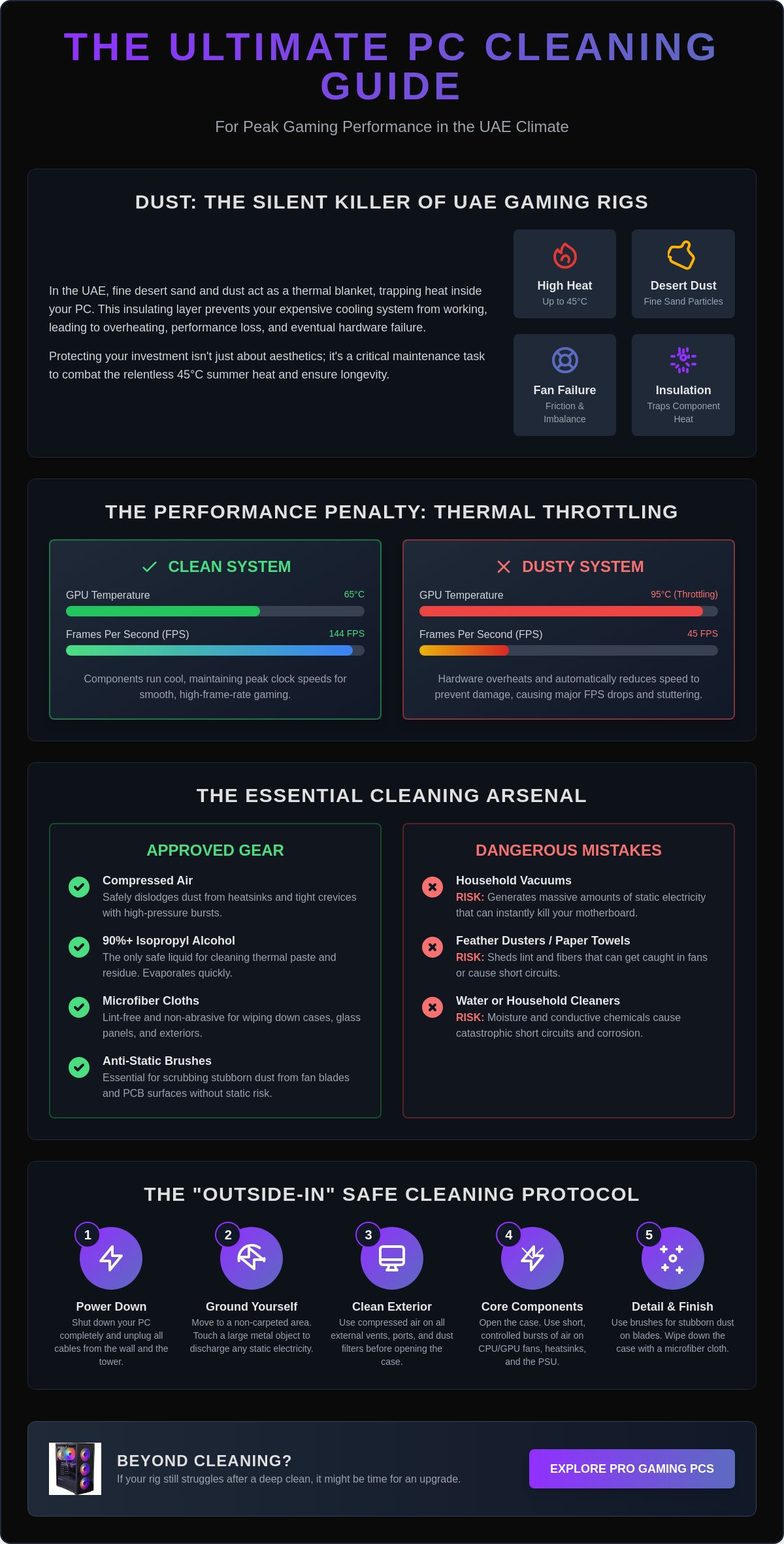
Dust is the ultimate enemy of every gamer in the Emirates. In our local environment, fine desert sand and household particles don’t just sit on surfaces; they act as a high-performance insulator. This layer of grime traps heat directly against your silicon, preventing your cooling system from doing its job. When your CPU and GPU can’t breathe, they get hot fast. Learning how to clean your gaming pc safely isn’t just about making your rig look good for social media. It’s about preventing a slow, silent death for your expensive hardware. Protecting your investment now is significantly cheaper than replacing a fried GPU or a dead power supply later.
Every speck of dust on your fan blades adds weight and creates imbalance. This creates extra friction, which wears down fan bearings and leads to premature hardware failure. You might notice your PC getting louder as the fans struggle to spin against the resistance. Don’t ignore these warning signs. Consistent how to clean your gaming pc safely routines ensure that your fans stay quiet and your airflow remains unobstructed. Maintenance is a professional-level skill that saves you thousands of Dirhams in the long run.
The Impact of Thermal Throttling on FPS
Thermal throttling is your system’s emergency defense mechanism. When internal temperatures hit a critical limit, your hardware automatically drops its clock speeds to prevent itself from melting. You will experience this as a massive drop in FPS or sudden stuttering during intense gaming sessions. Even a high-value system like the Budget King PC Build can feel sluggish and underpowered if its heatsinks are choked with grime. Clean components maintain higher clock speeds for longer periods. This ensures you get the professional-level performance you actually paid for without the frustration of heat-induced lag.
How Dust Damages Hardware Over Time
The UAE climate adds a unique challenge: humidity. When moisture levels rise, dust becomes “sticky” and clings to your components like a thick paste. This makes it much harder to remove with just a quick blast of air. This buildup also increases the risk of static electricity, which can lead to catastrophic short circuits on your motherboard. Following Computer maintenance best practices keeps these moving parts and electrical pathways clear. Long-term reliability depends on your cooling fins staying clear so your fans can run at lower, more efficient speeds. Don’t let your high-end rig become a victim of the desert climate; stay ahead of the buildup.
The Essential Cleaning Toolkit: What You Need (And What to Avoid)
Stop reaching for that old feather duster. Professional-level maintenance requires a specific set of tools to ensure you don’t turn a cleaning session into a hardware funeral. Learning how to clean your gaming pc safely starts with your shopping list. You can find basic cleaning kits in the UAE for as little as AED 20, but for serious enthusiasts, a few specific items are non-negotiable. Building a proper kit is a savvy investment that protects your high-end components from accidental damage.
- Compressed Air: A 350ml can usually costs between AED 25.00 and AED 32.50. It provides the high-pressure burst needed to dislodge sand from tight crevices.
- 90% Isopropyl Alcohol: This is the only liquid that should ever touch your PCB. It cleans thermal paste and sticky residue without leaving moisture behind.
- Microfiber Cloths: Unlike paper towels or old t-shirts, these don’t shed lint or create static. They are essential for wiping down the exterior and glass panels.
- Anti-Static Brushes: These are vital for scrubbing heatsinks and fan blades where air alone won’t cut it.
The Danger of Household Vacuums
Don’t use your home vacuum cleaner on your PC. It seems like an easy shortcut, but it’s a dangerous mistake. Vacuum nozzles generate massive amounts of static electricity as air rushes through the plastic tube. One tiny discharge is enough to kill a motherboard or fry a sensitive capacitor. Vacuums are also too powerful. They can easily rip off small jumpers or damage delicate surface-mounted components. Regarding dust, blowing is always safer than sucking. You want to push the debris out of the case, not pull your hardware into a nozzle.
Professional Tools for Enthusiasts
If you find yourself cleaning every three months to keep your Pro Gaming PC running cool, consider an electric air duster. It’s a one-time investment that replaces hundreds of cans of compressed air, making it the savvy choice for long-term savings. You should also keep a pack of cotton swabs nearby. They are the secret weapon for detailing fan blades and getting into the corners of your GPU shroud. While an anti-static wrist strap is a great safety measure, staying grounded by touching the metal chassis of your plugged-in (but powered off) PC is usually enough for a basic clean. Mastering how to clean your gaming pc safely is about using the right tool for the right job.
Step-by-Step: How to Clean Your Gaming PC Safely
Ready to see those temperatures drop and your FPS stabilize? You don’t need to be a certified technician to get professional results. Many online tutorials suggest a complete teardown, but that’s often unnecessary and increases the risk of damaging delicate pins. Following a structured, “outside-in” approach is the most effective way to learn how to clean your gaming pc safely. This method ensures you remove the bulk of the desert grime before it has a chance to settle deeper into your components. Let’s get your rig back to its peak performance state with zero stress.
Preparing Your Workspace
Safety starts before you even touch a screwdriver. Move your PC to a hard, flat surface like a wooden desk or a tiled floor. Avoid carpets at all costs. Walking on a rug can build up static charges that could fry your motherboard instantly. Once you’ve moved the tower, unplug the power cable from the wall. Press and hold the PC’s power button for at least 30 seconds. This “30-second rule” is vital because it discharges any electricity remaining in the capacitors. To keep things organized, use a small magnetic tray or even a clean egg carton to hold your case screws. Knowing exactly where every fastener goes makes the reassembly process fast and fearless.
Cleaning the Core Components
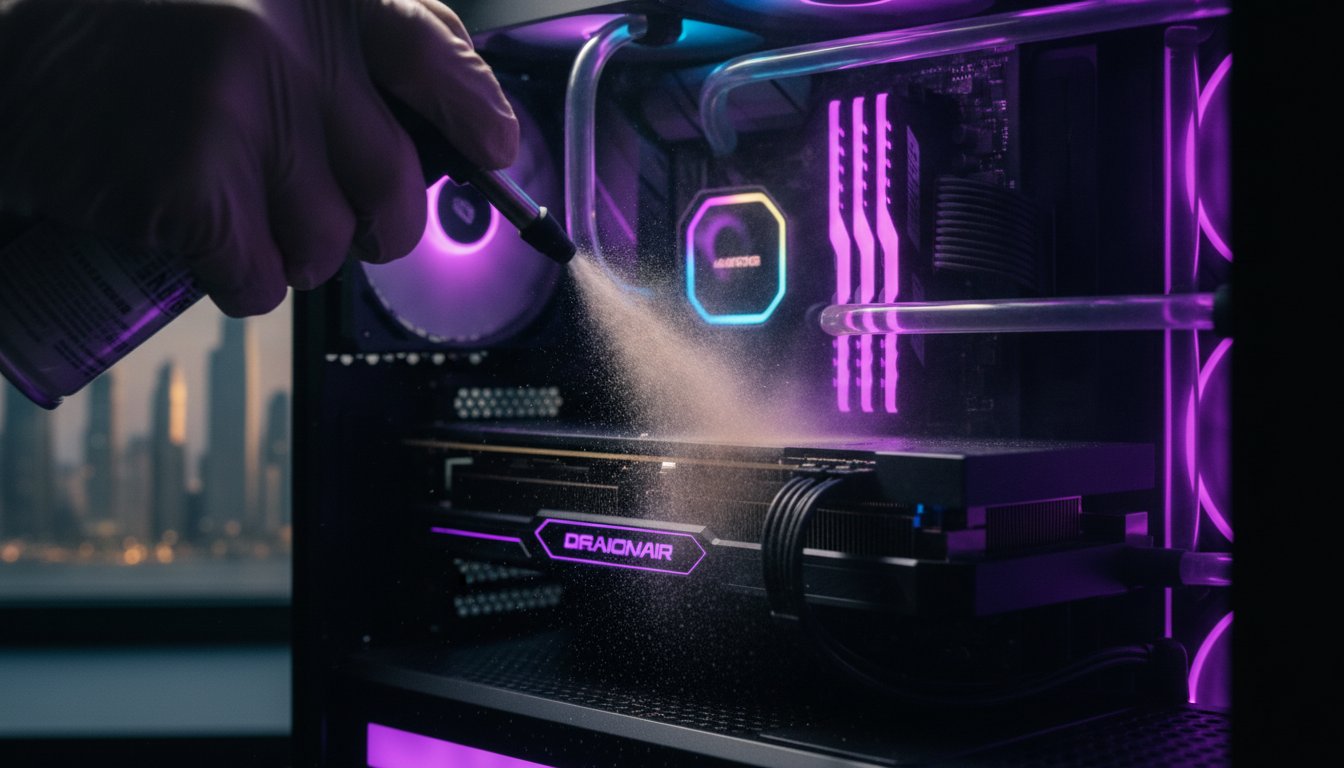
Start with the exterior dust filters. These are your first line of defense. Remove them and use your compressed air or electric duster to blow the sand away from the case, not into it. Once the filters are clear, open the side panel to access the heart of your machine. Focus on the heaviest hitters first:
- The GPU: Use short bursts of air to clear the heatsink fins. You don’t need to remove the plastic shroud. Just ensure the air flows through the cooling stack to dislodge trapped particles.
- CPU Cooler: If you’re running a high-performance setup like The Beast Gaming System, your air tower or AIO radiator will likely have thick cooling fins. Direct your air duster through these fins to restore proper thermal conductivity.
- RAM and Motherboard: These are delicate. Use very light, angled bursts of air to whisk away surface dust. Never touch the circuits directly with your fingers to avoid leaving oily residue.
One critical rule for how to clean your gaming pc safely involves your fans. Never let your fans spin freely while you’re blowing air on them. Use a finger or a cotton swab to hold the blades perfectly still. Over-spinning a fan with compressed air can generate a small electrical voltage that travels back into the motherboard, or it can simply ruin the fan bearings. Take your time, work in a well-lit area, and watch that UAE dust disappear.
Gaming in the Desert: Maintenance Tips for UAE Climate
The UAE environment is uniquely hostile to high-performance hardware. While international tech sites suggest a bi-annual dusting, our local conditions demand a strict 3-month maintenance schedule. High ambient temperatures, often peaking at 45°C during summer, mean your cooling system is already under immense stress. Even a small amount of sand can be the tipping point that leads to thermal throttling. Learning how to clean your gaming pc safely in this climate requires a more aggressive approach to prevention than in other regions.
Humidity also plays a massive role in our indoor environments. Constant air conditioning creates a cycle where fine dust particles mix with moisture, forming a sticky residue on your heatsinks. This isn’t the dry, fluffy dust seen in cooler climates. It clings to your components. It requires consistent attention to keep your airflow paths clear and your temperatures under control. If you ignore this buildup, your fans will work harder, get louder, and eventually fail.
Optimizing Airflow for Dust Prevention
Prevention is just as important as the cleaning process itself. You should aim for a “positive pressure” fan configuration. This means having more intake fans than exhaust fans. This setup forces air out of every small crack and seam in your case, preventing dust from being sucked in through unfiltered gaps. Always use magnetic dust filters on your intake fans. They are easy to remove and wash, making your 3-month maintenance cycle much faster and more effective.
Where you place your machine matters. Never keep your PC on the floor in the UAE. Floors are heat traps and dust magnets. Elevate your rig onto a desk to give it access to cleaner, cooler air. For a deep dive into the perfect fan layouts for our region, check out our PC Build UAE guide. This simple change in placement can reduce your dust accumulation by up to 50%.
Dealing with Fine Sand and Dust
Standard case filters often struggle with the ultra-fine silt found in the Emirates. These particles eventually find their way into your Power Supply Unit (PSU). The PSU is often the most overlooked component during maintenance, yet it’s critical for system stability. Use short bursts of air to clear the PSU fan and internal components through the back vent. If you notice that cleaning no longer lowers your temps, it might be time for a professional thermal paste re-application.
Maintaining a high-end system like The Beast Gaming System requires diligence. Stay ahead of the sand, keep your filters clean, and your hardware will deliver professional-level performance for years. Knowing how to clean your gaming pc safely is the best way to ensure your investment survives the desert heat without losing its edge.
Beyond Cleaning: When It’s Time for a Performance Upgrade
Even after you’ve mastered how to clean your gaming pc safely, you might find your temperatures still hitting the red zone. Cleaning is a maintenance fundamental, but it has its limits. If your fans are spinning at max speed while you’re just browsing the web, you’ve reached a hardware bottleneck that air alone can’t fix. This is where the ‘Budget King’ philosophy comes into play. It’s about recognizing when to stop spending time on old tech and when to invest in a performance leap that gives you the best value per Dirham. Savvy gamers know that hardware has a lifespan, and the UAE heat can accelerate the need for a fresh start.
Maintaining a clean rig also protects your financial future. When you decide to move on, a well-kept system fetches a much higher price in the local market for Pre-owned Gaming PCs. Buyers look for clear signs of care. A spotless interior and a documented cleaning schedule prove the components haven’t been baked by three years of desert heat. It’s the most effective way to subsidize your next build. Documenting your maintenance isn’t just about performance; it’s about preserving the resale value of your investment.
Thermal Paste: The Next Level of Maintenance
If your PC is dust-free but still runs hot, your thermal paste has likely dried out. Thermal paste is the conductive bridge between your CPU and its cooler. Over time, the intense UAE climate causes this compound to crack and lose its effectiveness. High idle temperatures are the primary warning sign. While we’ve shown you how to clean your gaming pc safely, re-pasting is a more advanced task. We recommend professional help for your first time to avoid bending pins or applying too much pressure. You can check out the cooling specifications for modern systems in our Pre-built PC UAE guide to see how current hardware handles heat management.
Upgrading to a Modern System
Sometimes the hardware simply can’t keep up with the demands of 2026 titles. If you’re struggling with low FPS despite a pristine, cool-running machine, it’s time to look at an upgrade path. You don’t have to break the bank to get back into the game. Trading in your current rig for a Pro Gaming PC or an Ultra High-End PC build ensures you stay ahead of the curve. At Budget Gamer UAE, we believe every enthusiast deserves a professional-grade experience without the elitist price tag. We focus on economic efficiency so you get the frames you need. Ready for a fresh start? Check out our latest high-performance builds!
Dominate the Heat and Protect Your Frames
Your gaming rig is a major investment. Don’t let the UAE’s fine desert dust steal your performance or shorten your hardware’s lifespan. By sticking to a 3-month maintenance schedule and using the right tools, you’ve mastered how to clean your gaming pc safely. You now have the professional skills to prevent thermal throttling and keep your system running as quiet as the day you unboxed it. It’s about empowerment and taking control of your tech.
Sometimes, even the best maintenance can’t keep up with the newest gaming demands. When you’re ready for a fresh start, we’re here to help. Secure your next high-performance rig at Budget Gamer UAE. We provide expert local assembly and tiered builds for every budget. Whether you need the Budget King or the Beast Gaming System, we offer UAE-wide delivery and support. Take pride in your setup. Stay cool, keep it clean, and enjoy every frame of your gaming journey.
Gaming PC Maintenance: Your Top Questions Answered
Can I use a hairdryer to clean my gaming PC?
No, you should never use a hairdryer on your hardware. Hairdryers generate significant static electricity and the heat can be intense enough to damage sensitive surface-mounted components. Instead, invest in a dedicated electric air duster or a can of compressed air to ensure you know how to clean your gaming pc safely without risking a short circuit.
How often should I clean my PC if I live in the UAE?
You should clean your PC every three months in the UAE. Our local environment is filled with fine desert sand and high humidity, which creates a sticky layer of grime faster than in cooler climates. This frequent schedule prevents thermal throttling and keeps your Pro Gaming PC running at professional standards during the intense 45°C summer months.
Is it safe to use a vacuum cleaner for the dust inside my computer?
No, using a vacuum cleaner inside your PC is extremely dangerous. The air rushing through the plastic nozzle creates a massive static charge that can discharge into your motherboard, killing it instantly. Stick to blowing the dust out of the case with compressed air. It’s much safer to push the dust away than to risk a static shock.
Do I need to take apart my GPU to clean it safely?
No, a full teardown is usually unnecessary for routine maintenance. You can effectively clear the heatsink and fans by using short bursts of compressed air through the cooling fins. Taking apart a GPU risks damaging the thermal pads or voiding your warranty. Only consider a full teardown if you’re an expert or need to replace dried-out thermal paste.
What happens if I never clean my gaming PC?
If you never clean your rig, it will eventually overheat and fail. Dust acts as an insulator that traps heat, forcing your components to slow down to prevent melting. This results in terrible FPS and constant stuttering. Eventually, the heat will degrade the silicon in your GPU and CPU, leading to a dead system that costs thousands of Dirhams to replace.
Can I use wet wipes or water to clean the fans?
No, water and household wet wipes should stay far away from your internal components. Moisture can cause corrosion or short circuits if it drips onto the PCB. If your fan blades have sticky UAE dust, use a cotton swab dipped in 90% or higher isopropyl alcohol. It evaporates almost instantly and is the only liquid you should use for how to clean your gaming pc safely.
Will cleaning my PC increase my FPS in games?
Yes, cleaning can significantly improve your FPS if your hardware was previously overheating. When your PC is clean, the cooling system works efficiently, allowing your CPU and GPU to maintain their maximum “boost” clock speeds. This eliminates the stuttering caused by thermal throttling and ensures you get the full performance of your Budget King PC Build.
Do I need an anti-static wrist strap for basic dusting?
An anti-static strap is a helpful safety tool, but it’s not strictly required if you follow basic precautions. You can stay grounded by touching the metal part of your PC case frequently while you work. Just make sure you’re working on a hard surface and not a carpet. This simple habit is usually enough to protect your hardware during a standard cleaning session.