Blog
Choosing the Best Computer Screen for Your PC in the UAE: 2026 Guide

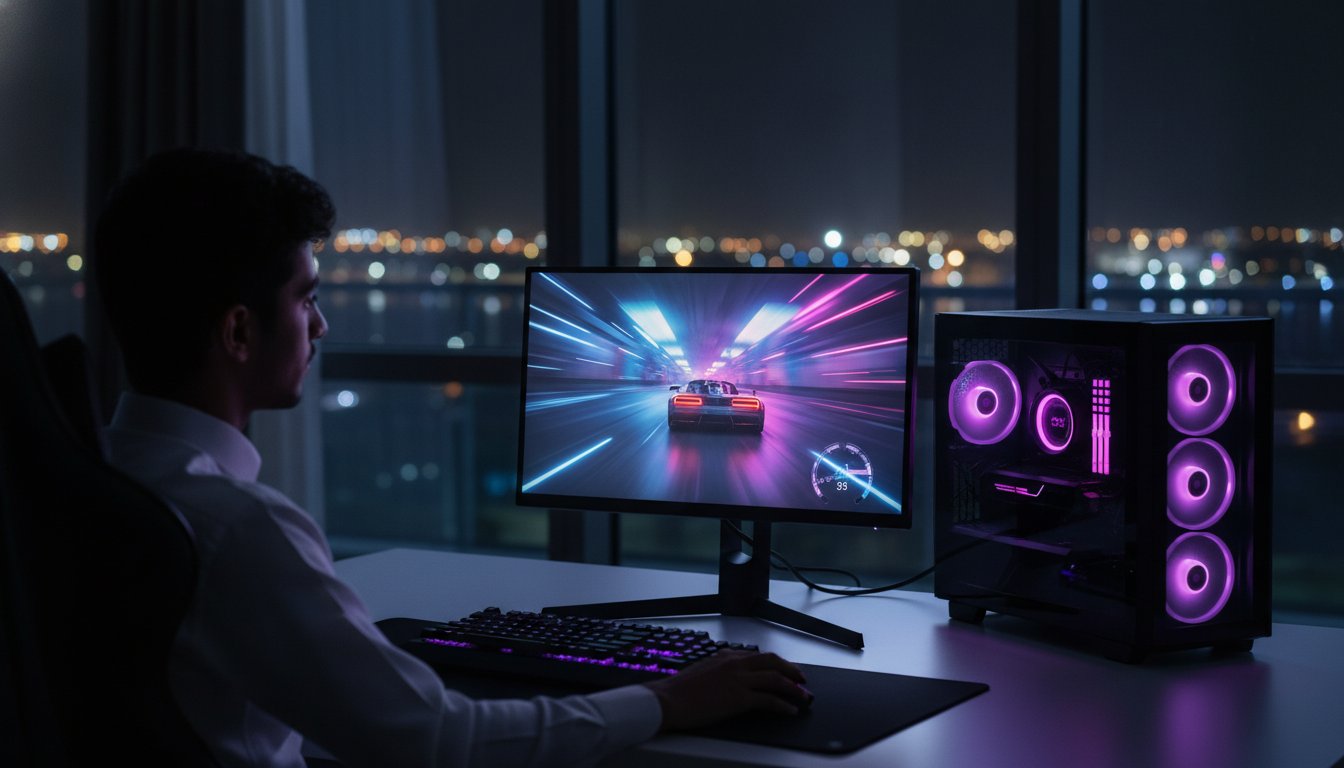
What if your brand new 4K setup is actually destroying your K/D ratio? It sounds crazy, but blowing your budget on a high-res display that your GPU can’t handle is the fastest way to trigger screen tearing and soul-crushing lag. You want crisp visuals and smooth movement, but technical jargon makes every computer screen look like a massive gamble. We get it. You want to play like the pros without needing a bank loan to do it.
We agree that finding the sweet spot between performance and price is tougher than a final boss fight in 2026. This guide shows you exactly how to select a display that matches your PC’s power perfectly. You’ll learn how to avoid overspending on unnecessary features while securing the best deals in the UAE, like the BenQ ZOWIE XL2731 for just 580 AED or the Samsung ViewFinity S8 starting at 1,109 AED. We’re previewing the top 2026 trends, from AI-powered sharpening to interest-free payment plans that let you play now and pay later. Let’s get your station upgraded with the expert gear you deserve.
Key Takeaways
- Stop falling for marketing hype and understand why a dedicated gaming monitor crushes a standard TV for response speed.
- Master the 144Hz standard and low response times to ensure your gameplay stays smooth and ghost-free.
- Find your perfect resolution match between budget-friendly 1080p and the high-performance 1440p “sweet spot” for 2026.
- Learn the “Balanced Build” philosophy to choose a computer screen that perfectly complements your GPU without wasting money.
- Unlock interest-free payment options and local UAE warranties to upgrade your setup with zero financial stress.
What is a Computer Screen? Choosing Quality Over Hype
Your computer screen is more than just a peripheral. It’s the primary interface between your eyes and your PC’s hardware. A high-quality Computer monitor translates raw data into the visuals you see while gaming, designing, or working. With the global monitor market reaching $75.23 billion in 2026, manufacturers are packing more tech into budget-friendly units than ever before. You don’t need to spend a fortune to get a professional-grade experience, but you do need to know which specs actually matter for your specific needs.
Many beginners try to save money by using a standard living room TV. This is usually a mistake for serious users. TVs are built for cinematic viewing and often include heavy post-processing that creates massive input lag. A dedicated monitor is engineered for speed and precision. In 2026, value for money is the ultimate metric. You want a display that maximizes your PC’s output without charging you for “premium” marketing fluff you’ll never use.
Why a Dedicated Monitor Changes the Game
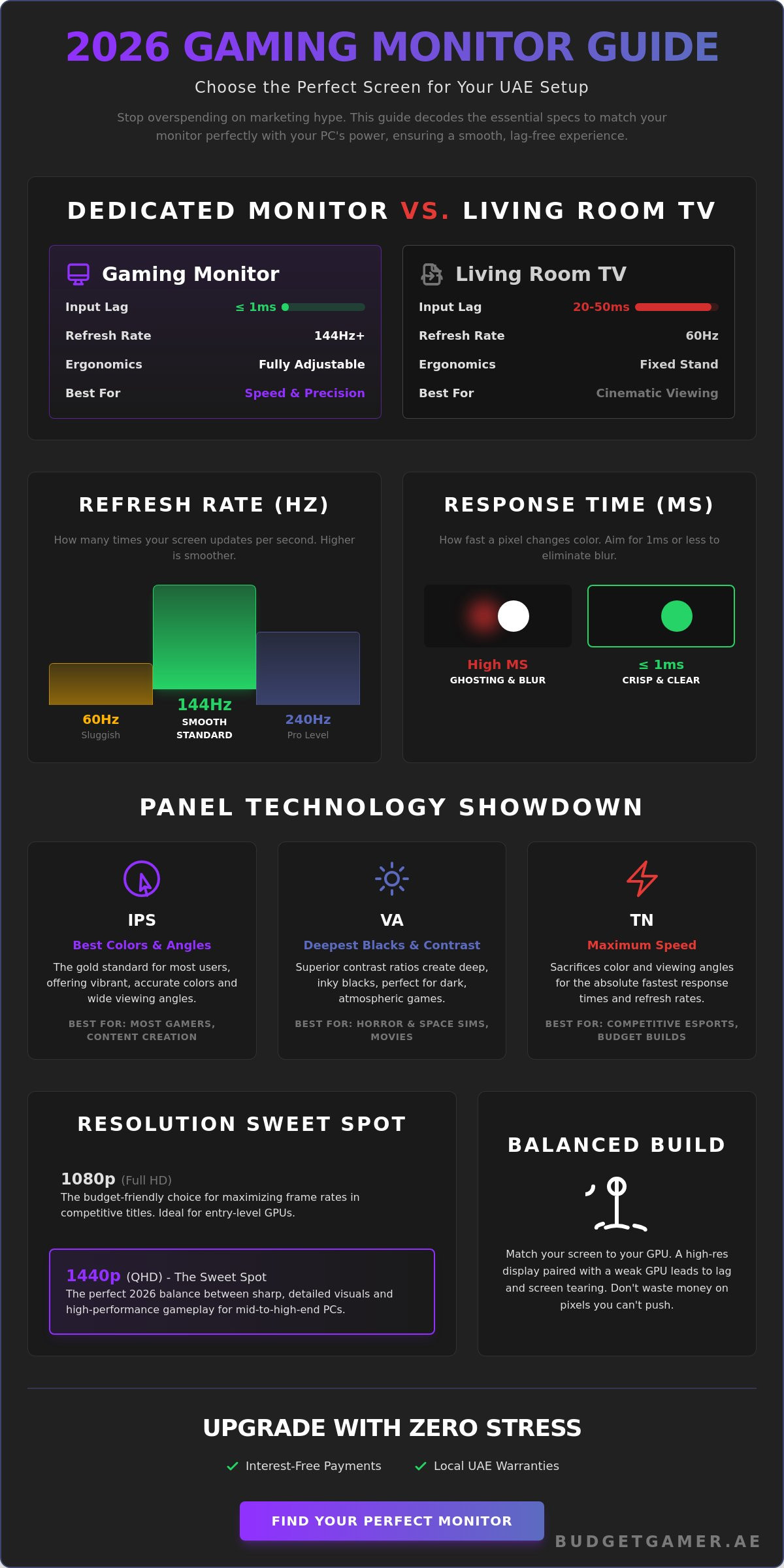
Input lag is the hidden enemy of every gamer. While a standard TV might have a delay of 20 to 50 milliseconds, modern gaming monitors often hit 1 millisecond or less. This difference determines whether your shot lands or you end up back at the respawn screen. Beyond speed, ergonomics play a massive role in your daily comfort. Most dedicated computer screen models feature adjustable stands that allow you to tilt, swivel, and change height. This prevents neck strain during those marathon gaming sessions or long workdays.
Pixel density is another critical factor. A 27-inch 1440p monitor has much higher pixels per inch (PPI) than a 55-inch 4K TV. This means text looks sharper and game textures appear more detailed when you’re sitting at a desk. You get a clearer image without forcing your graphics card to work overtime.
Office vs. Gaming Screens: What’s the Difference?
Standard office monitors usually stick to a 60Hz refresh rate. This is fine for spreadsheets and emails, but it feels sluggish for anything else. Gaming displays have pushed the national standard to 144Hz and beyond in 2026. This higher frequency makes every movement on screen feel fluid and responsive. If you want to Play Like The Pros, you need that high-speed edge.
Content creators have different priorities. They look for color accuracy and high contrast ratios to ensure their edits look perfect on every device. Gamers, however, should prioritize speed and low response times. We categorize screens into three main tiers to help you choose:
- Office: Reliable, budget-friendly, and perfect for daily tasks.
- Content Creation: Focused on color depth and high resolutions for visual artists.
- Gaming: Built for high refresh rates and zero-lag performance.
Identifying your primary use case early saves you from blowing your budget on the wrong features. Get the speed you need for the win, or the clarity you need for the job.
Decoding Technical Specs for the Savvy UAE Gamer
Specs can feel like a wall of text, but they are the secret to a perfect computer screen setup. In 2026, the baseline for a smooth experience has shifted. If you are still playing on a 60Hz display, you are essentially seeing half the action. A 144Hz refresh rate is now the national standard in the UAE for any serious setup. It means your screen updates 144 times every second, making fast-paced movement in titles like Valorant or Apex Legends feel buttery smooth. For those looking to Play Like The Pros, moving up to 240Hz is the next logical step, especially since high-speed panels have become significantly more affordable this year.
Response time is the other half of the speed equation. Measured in milliseconds (ms), this tells you how fast a pixel can change color. You want to aim for 1ms or less. High response times cause “ghosting,” where a blurry trail follows moving objects. It ruins immersion and makes it harder to track targets. When you pair a 144Hz refresh rate with a 1ms response time, you eliminate the hardware bottlenecks that hold back your skills. If you want to see these specs in action, check out the latest gaming monitor deals available locally.
Panel Technology: IPS vs. VA vs. TN
IPS panels are the gold standard for viewing angles and vibrant color reproduction, making them the top choice for most users. If you prefer immersive, dark-themed games like horror or space sims, VA panels are your best bet because they offer superior contrast ratios and deep blacks. Choose a TN panel only if you are chasing extreme budget savings or the absolute highest refresh rates for competitive esports, as they sacrifice color quality for raw speed.
Brightness and HDR: Do You Need It?
Brightness is measured in “nits.” Most standard displays sit around 250 to 300 nits, which is plenty for a typical room. However, if your desk is near a sunny window in Dubai, look for 400 nits or higher to beat the glare. High Dynamic Range (HDR) is a 2026 trend that adds massive visual depth by making bright spots brighter and shadows darker. It makes the world look more realistic, but there is a catch for those on a budget.
Cheap “HDR400” certifications often don’t provide a true HDR experience. If you are trying to keep costs down, skip the entry-level HDR features and put that money toward a higher refresh rate or a better panel type instead. You will notice the extra speed much more than a mediocre brightness boost.
Finally, make sure your screen supports Adaptive Sync. Whether it is Nvidia G-Sync or AMD FreeSync, this tech synchronizes your computer screen refresh rate with your GPU’s frame rate. This prevents screen tearing, that annoying horizontal “rip” in the image during fast movement. Most modern displays support at least one of these, ensuring your gameplay stays locked and fluid without visual glitches.
The Great Debate: 1080p vs. 1440p Resolution
Choosing a resolution isn’t just about picking the highest number. It’s about finding the perfect synergy between your GPU and your computer screen. If you buy a 4K monitor but only have a mid-range card, you’ll be stuck playing at 30 FPS. That’s a recipe for frustration. In 2026, the real battle is happening between 1080p and 1440p. While 4K is beautiful, it requires a massive GPU investment that often kills the “budget” part of a budget build. Most gamers in the UAE find that 4K is overkill for a standard desk setup where you sit only 60cm away from the display.
Pixel density is the secret factor most people ignore. If you have a small desk or a compact apartment in Dubai, you don’t need a massive screen. A 24-inch or 27-inch display is usually ideal. However, 27 inches is the absolute limit for 1080p resolution. Any larger, and the pixels become visible, making images look blocky or blurry. If you want a 32-inch screen, you must step up to 1440p to keep things sharp. This is the practical advice that many big retailers miss. Don’t buy a screen that’s too big for your resolution or too demanding for your PC’s power.
Why 1080p is Still the Budget King
For many, 1080p (Full HD) remains the smartest choice. It’s the king of budget performance because it places much less stress on your graphics card. This allows you to hit those high 144Hz or 240Hz refresh rates we discussed earlier without needing an elite-tier GPU. If you’re following our Budget King PC Build, sticking to 1080p ensures your system stays fast and responsive. Plus, the money you save on the screen can be reinvested into a high-precision mouse or a mechanical keyboard. It’s all about maximizing your total setup value. You get more frames for every dirham spent.
Stepping Up to 1440p (QHD)
If your PC has a bit more kick, 1440p (Quad HD) is the “Sweet Spot” for 2026 gaming. It offers 78% more pixels than 1080p, providing a massive jump in visual clarity. Text is crisper, and environments look far more detailed. This resolution is absolutely perfect for a 27-inch computer screen, offering the best balance of size and sharpness. As the market grows, your gaming monitor options in this category are expanding rapidly. Prices for 1440p panels have dropped by nearly 15% since early 2025, making them accessible for mid-tier builds. It’s the ultimate upgrade if you want that pro look without the 4K price tag.
Matching Your Display to Your PC Build Tier
Building a powerful PC only to pair it with a basic office display is like putting bicycle tyres on a Ferrari. You have the horsepower, but you can’t put that speed on the road. This is known as “The Bottleneck Effect.” Your computer screen must be capable of displaying the frames your GPU produces, or you are simply wasting money on high-end hardware you can’t actually see. A balanced build ensures every dirham you spend translates into a better visual experience. We’ve broken down the best pairings based on the most common PC tiers in the UAE for 2026.
- Entry-Level: If you’re running an RTX 3050 or similar budget GPU, stick to 1080p at 75Hz or 100Hz. It’s smooth, affordable, and easy on your hardware.
- Mid-Range: Systems with an RTX 4060 or the newer RTX 5060 are the “Pro” sweet spot. These rigs deserve a 1080p 144Hz or a 1440p 100Hz display.
- High-End: For those wielding an RTX 4080 Super or better, only 1440p 240Hz or 4K displays will do. This is where you unleash the true “Beast” of your system.
Remember that connectivity matters just as much as the panel itself. To hit the highest refresh rates without flickering, you should use DisplayPort 1.4 instead of older HDMI cables. This ensures you have the bandwidth required for high-speed gaming without signal drops. Ready to find your perfect match? Explore our curated monitor collection today and sync your gear the right way.
The Budget King Pairing
Maximum value usually lives in the 24-inch 1080p category. This size is the gold standard for competitive gaming because it keeps the entire computer screen within your field of view. When you pair this with a budget-friendly rig, you can easily hit 100+ FPS in optimized titles like Valorant, CS2, or League of Legends. It is the most cost-effective way to Play Now without waiting months to save up for a 4K setup that your PC might struggle to run anyway. You get a crisp, responsive image that lets your skills shine through immediately while keeping your budget intact.
The Ultra and Beast Configurations
If you’ve invested in a high-performance rig, you need a display that matches that ambition. Moving to a 1440p or Ultrawide screen provides a massive boost in immersion. Curved screens are particularly effective here. They wrap the action around your peripheral vision, making the game world feel much larger and more engaging. These high-end configurations allow you to see more of the battlefield at once, which is a literal game-changer in open-world titles or racing simulators. Don’t let a weak screen hold back your top-tier components. Give your GPU the canvas it deserves to show off those ultra-settings.
How to Buy Your Next Screen with Zero Stress
You’ve matched your GPU. You’ve picked your resolution. Now comes the final boss: the checkout screen. Buying a new computer screen in the UAE is exciting, but it can be stressful if you aren’t careful. You want to ensure your investment is protected and that you aren’t stuck with a defective panel. By following a few simple steps, you can secure your dream setup and start playing immediately with total confidence. Choosing a local partner is the smartest move you can make to avoid the pitfalls of international shipping and hidden costs.
Always inspect your display the moment it arrives. Panel uniformity is a common issue even with premium brands due to manufacturing tolerances. Turn off the lights and open a completely black image to check for backlight bleed. This is when light leaks from the edges of the screen, which can be distracting during dark scenes in games or movies. Also, scan the display for dead pixels. These are tiny hardware defects where a pixel stays black or stuck on a single color. Buying from a local shop makes it much easier to request a replacement if your unit isn’t perfect. Most reputable UAE retailers offer a 24 to 48-hour window for immediate exchanges on DOA (Dead on Arrival) units.
Interest-Free Gaming with Tabby
High-performance gear doesn’t have to break the bank. You can upgrade to a top-tier computer screen without paying the full amount today. We’ve integrated flexible payment solutions to help you get the hardware you need right now while keeping your monthly budget in check. This is the ultimate way to Play Now, Pay Later without the stress of credit card debt.
- Split your total purchase into four easy monthly installments.
- Pay zero interest and absolutely no hidden fees.
- Get instant approval at checkout with just your Emirates ID.
For a deep dive into how this works, check out our Tabby UAE guide. It’s the most transparent way to manage your finances while building a pro-level battle station that would otherwise be out of reach.
Warranty and Local Expert Support
Why risk international shipping? Ordering from overseas might seem like a way to save a few dirhams, but shipping a fragile monitor across borders is a recipe for disaster. If it arrives cracked or develops a fault after a month, you’re stuck with a massive return shipping bill and weeks of waiting. Local UAE warranties ensure that help is just a phone call or a short drive away. You get a guaranteed 1-year or 2-year warranty that is honored right here in the Emirates.
At Budget Gamer UAE, we act as your trusted advisors. We intimately understand the local gaming community and provide the expert support you need to keep your rig running at peak performance. Don’t settle for a faceless corporate giant when you can have a local hero in your corner. You’re ready to make the jump. You have the knowledge. It’s time to Play Like The Pros. Shop the Best Value Computer Screens Now and take your gaming to the next level today.
Level Up Your Visual Experience Today
Picking the right computer screen is the final boss in your quest for the perfect setup. You now have the expert knowledge to distinguish between marketing hype and actual performance. Whether you are sticking with the budget-friendly 1080p king or stepping up to the 1440p sweet spot, you are ready to maximize every frame your GPU produces. Don’t let a weak display bottleneck your skills or your hardware. A balanced rig is the only way to ensure your gaming remains smooth and immersive.
We are here to make that transition seamless. Take advantage of interest-free installments via Tabby to split your cost into four easy payments with no hidden fees. Every display in our collection is part of our expert-tested gaming configurations, so you know it works perfectly with our build tiers. With a comprehensive local UAE warranty, your investment is safe and supported right here in the Emirates. There is no need to wait for international shipping or risk broken panels.
Upgrade Your Setup: Shop High-Performance Gaming Screens
It is time to stop compromising and start winning. Your journey to Play Like The Pros begins with a single click. Let’s get your new battle station ready for action today.
Frequently Asked Questions
Can I use a regular office computer screen for gaming?
Yes, you can, but it isn’t ideal for fast-paced action. Office screens usually cap at a 60Hz refresh rate and have higher response times, which leads to motion blur and input lag. If you want to Play Like The Pros, you need at least a 144Hz computer screen to keep your gameplay fluid and responsive. Standard office displays are fine for strategy games but struggle with competitive shooters.
Is a curved computer screen better than a flat one?
It depends on the size of the display and your goals for immersion. Curved screens are superior for ultrawide setups because they pull the edges of the panel into your peripheral vision. This reduces eye strain and makes the world feel more engaging. For a standard 24-inch or 27-inch display, a flat panel is perfectly fine and often more budget-friendly for most UAE gamers.
What is the best screen size for a computer monitor in 2026?
The 27-inch size is the gold standard for 2026. It provides the perfect balance of screen real estate and pixel density for 1440p resolution. If you are building a budget system for 1080p, a 24-inch display is a better choice to ensure the image stays sharp. Sizes above 32 inches usually require a jump to 4K resolution to prevent the visuals from looking blocky or pixelated.
Do I need an HDMI or DisplayPort cable for my computer screen?
You should use a DisplayPort 1.4 cable for the best gaming performance. While HDMI 2.1 is very capable, DisplayPort remains the PC industry standard for high refresh rate gaming. It easily handles the bandwidth required for 144Hz or 240Hz at 1440p without the flickering issues sometimes seen with older HDMI versions. Always check your GPU ports to ensure you are using the right connection for your hardware.
How much should I spend on a gaming monitor in the UAE?
Expect to spend between 500 AED and 1,500 AED for a high-quality experience. Verified 2026 prices show great value options like the BenQ ZOWIE XL2731 for 580 AED or the Samsung ViewFinity S8 starting at 1,109 AED. Avoid ultra-cheap, unbranded displays that don’t offer local UAE warranties. Investing in a reputable brand ensures you actually get the performance and refresh rates listed on the box.
What does “Refresh Rate” actually do for my gameplay?
Refresh rate determines how many times the computer screen updates the image every second. A 144Hz display updates 144 times per second, which is more than double the speed of a standard 60Hz screen. This makes every movement feel incredibly smooth and significantly reduces motion blur. It gives you a massive advantage in competitive games by allowing you to track moving targets with much higher precision.
Can my PC run a 4K computer screen?
Only if you have a top-tier GPU like an RTX 4080 Super or the latest high-end equivalents. Running modern titles at 4K requires massive processing power to maintain smooth frame rates above 60 FPS. If you have a mid-range card, you are much better off choosing a 1440p display. This allows you to enjoy high settings and high frame rates without the soul-crushing lag of an underpowered 4K setup.
Are refurbished or pre-owned computer screens worth buying?
They can be excellent deals if you can test the panel before buying. For example, a used Samsung 28-inch 4K screen can be found for as low as 300 AED in 2026. However, pre-owned units rarely come with a warranty. You must check for dead pixels and backlight bleed before handing over your cash. Buying new from a local expert ensures you have a valid UAE warranty and total peace of mind.