Blog
Gaming PC for Architectural Students in UAE: The 2026 Performance Guide


Why drop 20,000 dirhams on a “professional” workstation when a high-end gaming PC handles Revit 2026 even better? It’s a question every design student in Dubai and Abu Dhabi asks when their current laptop starts smoking during a final render. Finding the right gaming pc for architectural students uae doesn’t have to be a technical nightmare or a financial disaster. You need a machine that balances high single-core clock speeds for modeling with massive VRAM for those heavy Twinmotion exports.
We know the struggle of watching a 3D model lag just hours before a deadline. You want professional results without the corporate price tag. This guide shows you how to build a “Workstation-Lite” rig that survives the UAE heat and your heaviest workloads. We’ll break down the must-have 2026 specs, from RTX 50-series GPUs to the new 32GB RAM standards. Discover how to use interest-free payment options to get your hands on The Beast Gaming System or The Budget King PC Build today.
Key Takeaways
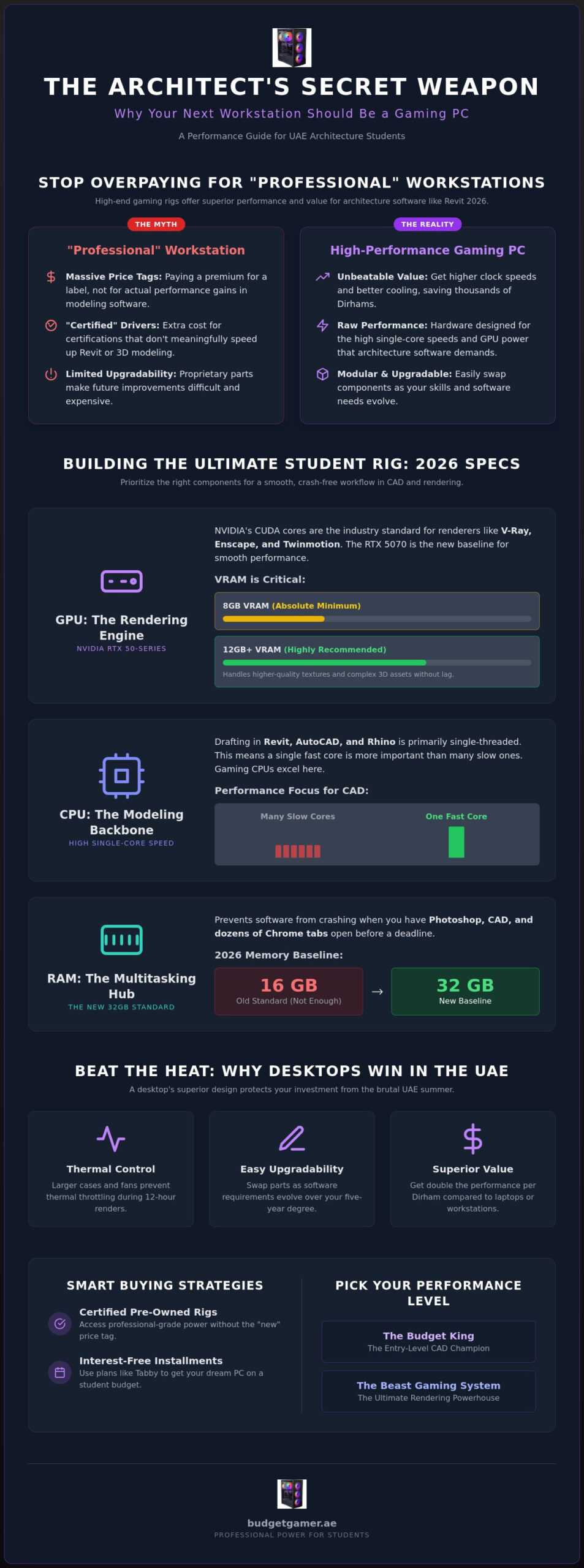
- Stop overpaying for “professional” workstations and learn why high-end gaming rigs offer superior performance for software like Revit 2026.
- Identify the perfect gaming pc for architectural students uae by prioritizing high single-core CPU speeds and NVIDIA RTX 50-series VRAM.
- Save money without sacrificing stability by choosing certified pre-owned rigs or using interest-free Tabby installment plans.
- Protect your investment from the UAE’s intense heat and dust with essential airflow optimization and cooling strategies.
- Pick your performance level between the entry-level CAD champion “The Budget King” or the rendering powerhouse “The Beast Gaming System.”
Why Gaming PCs are the Secret Weapon for Architectural Students
Stop falling for the “professional workstation” marketing trap. Most architecture students believe they need a specialized, high-priced workstation to survive their degree. They see the massive price tags on corporate laptops and assume that’s the only way to run Revit or ArchiCAD. It’s a myth. In reality, a high-performance gaming pc for architectural students uae is often the superior choice. These systems offer the exact hardware architecture required for modern Computer-Aided Design (CAD) and real-time rendering at a fraction of the cost. You aren’t just buying a machine for studio work; you’re getting a beast that handles AAA gaming on the weekends and heavy renders during the week.
The cost-to-performance ratio of gaming hardware is unbeatable. Professional-grade GPUs often charge a premium for driver certifications that don’t actually speed up your 3D modeling. By choosing gaming components, you save thousands of Dirhams while getting higher clock speeds and better cooling. It’s about working smarter, not spending more.
Software vs Hardware: The Architecture Connection
Architectural software isn’t built the way most people think. Programs like Revit and Rhino are primarily single-threaded. This means they rely on the speed of a single CPU core rather than a high core count. Gaming CPUs are designed specifically for high single-core clock speeds, making them perfect for drafting. When you move to rendering in Lumion or Enscape, the GPU takes over. These engines thrive on NVIDIA CUDA cores and high VRAM. In 2026, 32GB of RAM is the new baseline. It prevents software crashes when you have Photoshop, Chrome, and your CAD model open simultaneously. A solid rig ensures your workflow stays fluid, even with a hundred browser tabs open for research.
The Advantage of Desktop Systems in the UAE
While a laptop seems portable, a desktop system is the smarter long-term play for students in Dubai or Abu Dhabi. The UAE summer is brutal on electronics. Desktops offer massive airflow and space for high-end cooling solutions that keep your components from thermal throttling during a 12-hour render session. If you’re on a tight budget, pre-owned gaming PCs provide an incredible entry point. They allow you to access professional-grade power without the “new” price tag. Plus, desktops are modular. When you start your final thesis, you can easily swap your GPU or add more storage. You can’t do that with a laptop. A desktop grows with your skills.
- Thermal Control: Larger fans and cases handle the UAE heat better than thin laptops.
- Upgradeability: Swap parts as software requirements evolve over your five-year degree.
- Value: Get double the performance per Dirham compared to professional workstations.
Essential Specs: Building the Ultimate Student Rig
Choosing the right hardware for a gaming pc for architectural students uae is about finding the balance between raw power and stability. You don’t need the most expensive parts on the shelf. You need the parts that work together to prevent that dreaded “Not Responding” message at 3 AM. While gamers look for high frame rates, you need a machine that can handle complex geometry and high-resolution textures without breaking a sweat. In 2026, the baseline has shifted. Standard 16GB setups are no longer enough for professional-grade BIM work. You need a rig that can multitask across heavy design suites without slowing down.
The GPU: NVIDIA GeForce RTX for Rendering
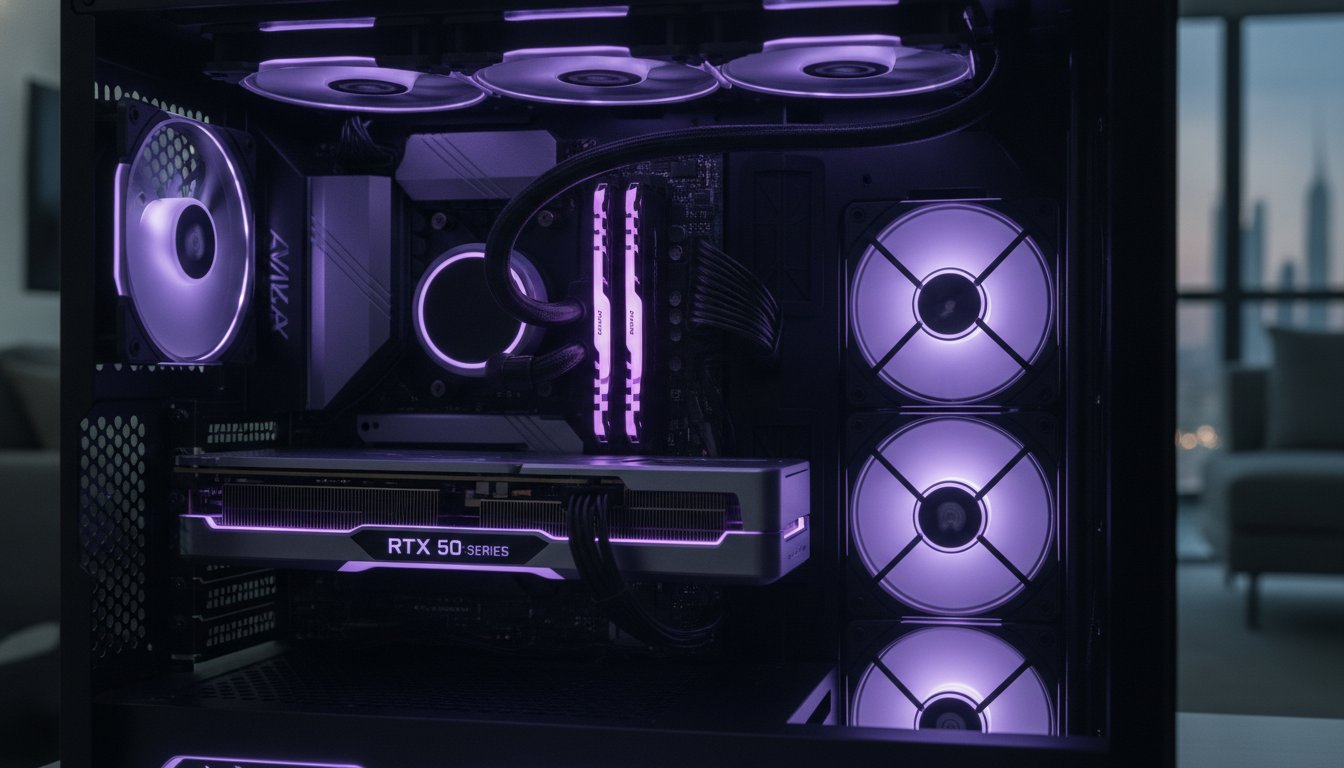
NVIDIA is the undisputed industry standard for architecture. Their CUDA cores serve as the primary engine for industry-leading renderers like V-Ray, Octane, and Enscape. If you plan on using Lumion or Twinmotion, your GPU is the most important component in your build. For 2026, we recommend the RTX 50-series. The RTX 5070 has become the new baseline for smooth performance in large-scale models thanks to its advanced ray-tracing capabilities. VRAM is critical here; 8GB is the absolute minimum, but 12GB or more is highly recommended for complex 3D environments. This extra memory allows you to load higher-quality textures and more detailed assets without system lag.
CPU and RAM: The Backbone of Your Workflow
When you’re drafting in AutoCAD or Revit, your CPU’s single-core clock speed determines your speed. Many students mistakenly buy chips with high core counts but lower speeds. Reference the official Revit 2026 system requirements and you’ll see that a high-frequency processor is essential for daily work. Intel Core Ultra and AMD Ryzen 9000 series are the top contenders this year. Pair your CPU with at least 32GB of DDR5 RAM. This is the sweet spot for 2026. If you’re working on massive models over 1GB, follow the “Rule of 20”: your RAM should be twenty times the size of your .rvt file. This means 64GB might be necessary for your final thesis projects.
Don’t forget storage and power. A dual-drive setup is the most efficient way to manage your work. Use a lightning-fast NVMe SSD for your operating system and active projects, then keep a high-capacity HDD for your massive archives. To keep everything running, invest in a high-quality Power Supply Unit (PSU). Render spikes can draw massive amounts of power instantly. A 750W or 850W Gold-rated PSU ensures your system doesn’t shut down during a critical render. If you want a system that’s already built to these high standards, check out The Beast Gaming System for a rig that handles anything university throws at you.
New vs Pre-owned: Smart Buying Strategies in the UAE
Building a professional portfolio shouldn’t require a massive bank loan. Many students believe that “new” is the only way to ensure reliability. This mindset often leads to overspending on entry-level hardware that struggles with complex renders. In reality, a high-performance gaming pc for architectural students uae can be acquired much more efficiently by looking at the certified pre-owned market. By choosing a rig that is one generation older, you can often secure a higher tier of GPU and more RAM for the same price as a basic new system. It’s about maximizing your Dirhams to get the best possible specs for your studio work.
The “Budget King” approach is our favorite strategy for design students. Instead of buying a low-end new PC, you invest in a certified pre-owned system that features a beefier power supply and a professional-grade cooling setup. Private marketplaces like Dubizzle are risky; you never know if a component has been pushed to its limit or poorly maintained in the UAE dust. Specialized shops offer a safer path. We provide a level of security you won’t find in a private sale, ensuring every component is ready for the intense demands of architectural software.
The Case for Certified Pre-owned Rigs
Buying pre-owned gaming PCs from a trusted source eliminates the gamble. Every system undergoes rigorous stress testing to ensure it can handle 100% CPU and GPU loads without crashing. This is vital when you’re taking advantage of the latest advances in architectural visualization that require massive amounts of VRAM. If you’re still deciding between a custom build or a ready-made rig, check out our PC build UAE guide to compare performance benchmarks across different component generations.
Financing Your Career: Installments in the UAE
Cash flow is the biggest hurdle for most students. High-end hardware is an investment in your career, but you don’t have to pay for it all at once. Using Tabby UAE allows you to split the cost of your rig into four interest-free installments. This is a far better alternative than high-interest credit cards or student loans. It frees up your budget to invest in essential peripherals like a high-resolution, color-accurate monitor. Remember, your PC is the engine, but you still need a high-quality screen to see your designs clearly. Splitting the cost makes “The Beast Gaming System” an attainable reality rather than a distant dream.
- Reliability: Certified rigs come with support that private sellers can’t match.
- Affordability: Get 20% to 40% more performance by choosing high-tier pre-owned parts.
- Flexibility: Tabby installments keep your monthly budget manageable.
Maintaining Your PC in the UAE Climate
Your gaming pc for architectural students uae is a high-performance tool, but the desert environment is its worst enemy. Dust and heat are silent performance killers. They will throttle your CPU and GPU if you don’t take maintenance seriously. In a region where ambient temperatures soar, your PC needs every advantage it can get to stay cool during those marathon studio sessions. Maintaining your rig isn’t just about cleaning; it’s about smart environmental management to ensure your hardware lasts through your entire degree. Don’t ignore your software, either. Keeping your NVIDIA Studio drivers updated ensures your hardware is optimized for the latest CAD patches and rendering engine updates.
Dust management is your first line of defense. Fine desert sand finds its way into every crevice, clogging heat sinks and slowing down fans. You should clean your filters every month and use compressed air to blow out the interior every quarter. Aim for positive airflow pressure in your case. This means having more intake fans than exhaust fans. This setup forces air out of the small gaps in your case and prevents dust from being sucked in through the cracks. Also, keep an eye on your thermal paste. The intense heat in the UAE can cause paste to dry out and lose efficiency faster than in cooler climates. We recommend repasting your CPU every 12 to 18 months to keep those temperatures in check.
Cooling Solutions for Long Renders
Choosing the right cooling setup depends on your lifestyle. While liquid cooling looks sleek, a high-end air cooler is often safer for a student who frequently moves their PC between home and the university studio. There’s no risk of leaks during transport. When selecting a case, prioritize mesh panels over tempered glass. Airflow is king when you’re rendering a complex 3D model. You should also set custom fan curves in your BIOS or software. Make sure your fans kick into high gear before the heat builds up during a heavy rendering task.
Protecting Against Power Fluctuations
Power stability is another local concern you can’t ignore. A high-quality surge protector is essential, but it isn’t enough for a design student. You need an Uninterruptible Power Supply (UPS). A 5-minute power flicker can ruin a 10-hour render, forcing you to start from scratch and potentially missing a critical deadline. A UPS gives you those vital minutes to save your work and shut down safely if the power drops. It’s a small investment that saves your progress and your sanity. If you want a rig that’s already optimized for the UAE’s unique challenges, check out the airflow-focused builds at Budget Gamer UAE today.
The Budget Gamer UAE Solution: Professional Power for Students
Finding a reliable gaming pc for architectural students uae doesn’t have to be a gamble. You need a partner who understands that your hardware is the foundation of your future career. We don’t just sell boxes of parts; we provide precision-engineered systems designed to crush your university workload. Whether you’re just starting with 2D drafting or you’re deep into a complex urban design thesis, we have a build that fits your specific needs and your budget. We’ve eliminated the guesswork by testing our rigs against the exact software suites you use every day in the studio.
For those just entering the world of design, we recommend The Budget King PC Build. This system is our entry-level CAD champion. It’s built to handle AutoCAD and Revit with ease, providing the high clock speeds you need for a fluid drafting experience. It’s the perfect way to get professional-grade performance without the heavy price tag of a corporate workstation. If your work involves heavy real-time rendering in Lumion or Twinmotion, it’s time to level up to The Beast Gaming System. This rig is a rendering powerhouse, packed with the VRAM and CUDA cores required to handle massive 3D environments and high-resolution textures without breaking a sweat.
- The Budget King PC Build: The ideal choice for 2D drafting and basic 3D modeling.
- The Beast Gaming System: Built for high-end rendering and complex thesis projects.
- Pre-owned Gaming PCs: Certified and tested rigs that provide maximum value for students.
- Customization: We tailor every build to match your specific university software requirements.
Why We Are the SAVVY Choice
We speak your language. Our team provides peer-to-peer expertise, meaning we know the hardware inside and out so you can focus entirely on your design work. You won’t find hidden retail markups or confusing sales tactics here. We offer transparent pricing and a deep commitment to the UAE student community. We are a local resource with a physical presence in the region, ensuring you get the support you need when it matters most. From national delivery across the UAE to reliable local support, we ensure your machine stays running through every deadline.
Get Started Today
Don’t let a slow computer hold back your creativity. Browse our current inventory of new and pre-owned rigs to find the perfect match for your studio. If you aren’t sure which components you need for your specific software list, consult with our team today. We’ll help you match your requirements to a build that offers the best performance for your Dirhams. Take the first step toward a smoother, faster workflow and Build your architectural powerhouse today!
Build Your Future Without Breaking the Bank
You’ve seen why a gaming rig is the ultimate tool for your design career. By prioritizing high single-core clock speeds for Revit and choosing massive VRAM for real-time rendering, you gain a massive edge in the studio. Owning a high-performance gaming pc for architectural students uae is no longer a luxury reserved for top-tier firms. It’s a practical necessity that you can afford right now by choosing smart, certified pre-owned options or specialized tiered builds. Don’t let the desert heat or technical confusion slow down your progress. Focus on your designs and let the hardware handle the heavy lifting.
Stop waiting for slow renders to finish. Upgrade Your Architecture Studio with a Budget Gamer Rig and take advantage of interest-free Tabby payments. We specialize in high-performance rendering builds and offer national UAE delivery to get your new system to your door fast. Your architectural vision deserves a machine that can keep up with your imagination. Let’s build something incredible together.
Frequently Asked Questions
Is a gaming PC better than a Mac for architecture students in the UAE?
A gaming PC is generally the superior choice because many industry-standard applications like Autodesk Revit don’t run natively on macOS. You get significantly more rendering power and VRAM for your money compared to a MacBook. This makes a gaming pc for architectural students uae a more versatile and cost-effective tool for your entire degree.
How much RAM do I really need for AutoCAD and Revit?
You need 32GB of RAM as your baseline for professional architectural work in 2026. While 16GB can handle basic drafting, complex BIM models require the “Rule of 20,” which suggests your system RAM should be 20 times the size of your project file. If you’re working on massive thesis projects, consider 64GB to prevent software crashes during final renders.
Can I buy a gaming PC in installments using Tabby?
Yes, you can split your purchase into four interest-free installments using Tabby. This financial flexibility allows you to acquire a high-performance rig like “The Beast Gaming System” without the stress of a massive upfront payment. It’s a savvy way to invest in your career while keeping your monthly budget manageable.
Do I need an NVIDIA RTX GPU for architectural rendering?
An NVIDIA RTX GPU is essential because most modern rendering engines like Enscape and V-Ray are optimized for CUDA cores. These cards provide the necessary VRAM and ray-tracing hardware to handle real-time visualization. Aim for an RTX 50-series card to ensure your system stays relevant throughout your five-year degree program.
Should I buy a new or pre-owned PC for my architecture degree?
Buying a certified pre-owned PC is often the smartest move for students on a budget. You can get a higher-tier GPU and more memory by choosing a rig that’s one generation older. Just ensure you buy from a specialist shop that performs rigorous stress testing and provides a warranty to avoid the risks of private marketplaces.
What is the best monitor for architecture students in the UAE?
Look for a 27-inch or 32-inch 4K monitor with an IPS panel for the best color accuracy and screen real estate. High resolution is vital for seeing fine details in CAD drawings and architectural renders. Brands like ASUS and Dell offer great options that pair perfectly with a high-end gaming pc for architectural students uae.
How do I protect my gaming PC from the heat in the UAE?
Prioritize a case with mesh panels and high-quality intake fans to combat the intense local heat. Clean your dust filters every month and keep your PC in a well-ventilated area with the AC running during heavy render sessions. Using an Uninterruptible Power Supply (UPS) also protects your hardware from power flickers caused by high summer demand.
Will a Budget King PC build run Lumion 2026?
“The Budget King” will run Lumion 2026 for small to medium-sized projects. It’s an excellent entry-point for students focusing on residential design or early-year studio work. However, if you plan on rendering massive urban landscapes or complex commercial buildings, you should consider stepping up to a more powerful rig with higher VRAM.