Blog
Gaming PC Noise Reduction UAE: The 2026 Guide to Silent Performance

We agree that you shouldn’t have to overspend on premium “silent” parts just to get some peace. You can achieve a stealthy, high-end setup that stays icy cold even during the peak of a UAE summer. This guide promises to teach you how to quieten your rig using expert techniques that prioritize both your ears and your hardware’s lifespan. We’ll preview the latest 2026 thermal solutions, explain how to optimize airflow for our dusty environment, and show you the software tweaks that turn a roaring beast into a silent assassin.
Key Takeaways
- Learn why UAE heat and dust force your fans to work harder and how to stop the cycle.
- Discover how “Zero RPM” power supplies and airflow-focused cases create a foundation for a quiet setup.
- Compare air and liquid cooling to see which thermal solution handles the desert climate with the least noise.
- Use undervolting and custom fan curves to master gaming pc noise reduction uae while maintaining peak performance.
- Find out how we optimize high-value systems like The Budget King PC Build for silent, professional-grade gaming.
Why Your UAE Gaming PC is Loud: The Heat and Dust Factor
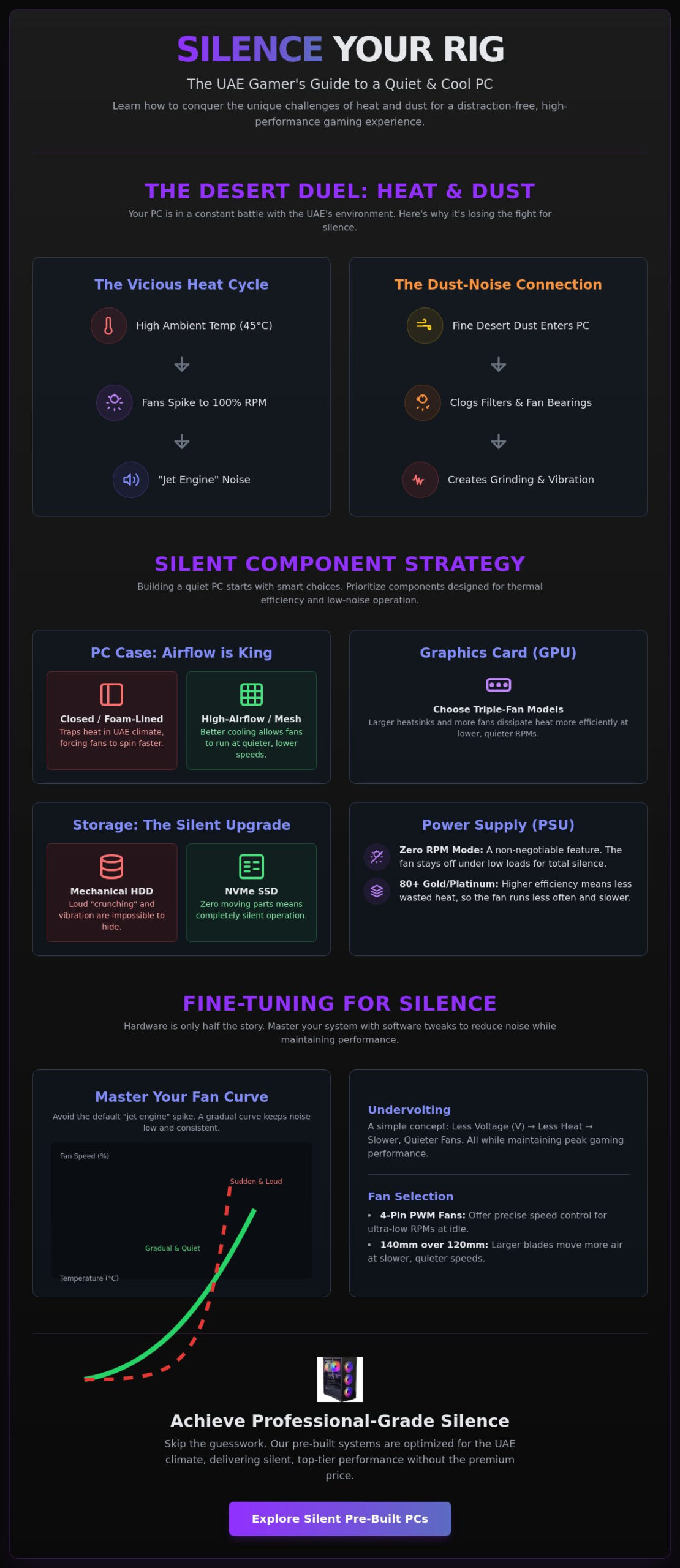
Living in the UAE means your PC is fighting a constant battle against the thermometer. When the mercury rises, your fans work overtime to push hot air out. This creates a vicious cycle where heat forces higher RPMs, and higher RPMs create that annoying jet-engine roar. Achieving effective gaming pc noise reduction uae requires understanding that our environment isn’t standard. Most components are tested in climate-controlled labs at 20°C. In a typical Dubai apartment during July, your ambient temperature might be much higher, rendering factory “silent” settings useless.
Understanding different computer cooling methods is the first step to diagnosing the racket. Noise usually comes from three distinct places:
- Fan Turbulence: This is the “whoosh” of air moving through tight grilles or dust filters.
- Coil Whine: A high-pitched electronic squeal from the GPU or PSU under heavy load.
- Vibration: Mechanical rattling that happens when high-speed fans vibrate a thin, budget-grade case.
Identifying the specific source helps you target the fix. If you hear a low-frequency hum, it’s likely a pump or a vibrating panel. If it’s a sharp whir, a small fan is likely spinning too fast and needs a curve adjustment.
The UAE Summer vs. Your Fan Curve
Standard “Silent” profiles often fail once the room temperature exceeds 25°C. Your BIOS sees the rising heat and panics, spiking fan speeds to 100% to prevent thermal throttling. This creates massive acoustic spikes that ruin your focus during intense gaming sessions. These spikes happen because the delta between your component temperature and the room air is too small. Even in the height of summer, running your fans at 100% is rarely necessary if your airflow is optimized correctly. You want a smooth, gradual curve that maintains steady pressure without the sudden roar of a jet engine.
The Dust-Noise Connection
Fine desert dust is a nightmare for fan bearings. It seeps into sleeve-bearing fans, increasing friction and turning a whisper into a mechanical grind. This often leads to the “unbalanced fan” phenomenon. Dust clumps on one side of a blade, causing it to wobble and vibrate against the frame. This doesn’t just make noise; it kills your fans faster. Establish a simple maintenance routine to restore factory-level silence. Just as you might rely on Wipe Crew to keep your vehicle clean in the Dubai heat, blasting your intakes with compressed air every few months will keep the friction low and the decibels lower.
Silent Component Selection: Building for Quietness
Building a silent rig isn’t just about spending more money on premium parts. It’s about choosing components that don’t fight against the UAE heat. If you want to skip the trial and error, looking at a Pre-built PC UAE can show you exactly how professionals balance acoustics and thermals. Your choice of case is the foundation. You might think a foam-lined, closed-off case is the best for gaming pc noise reduction uae, but that’s often a trap in our climate. Foam traps heat. In Dubai or Abu Dhabi, a high-airflow mesh case is usually quieter because it keeps internal temperatures low, allowing your fans to spin at much lower speeds.
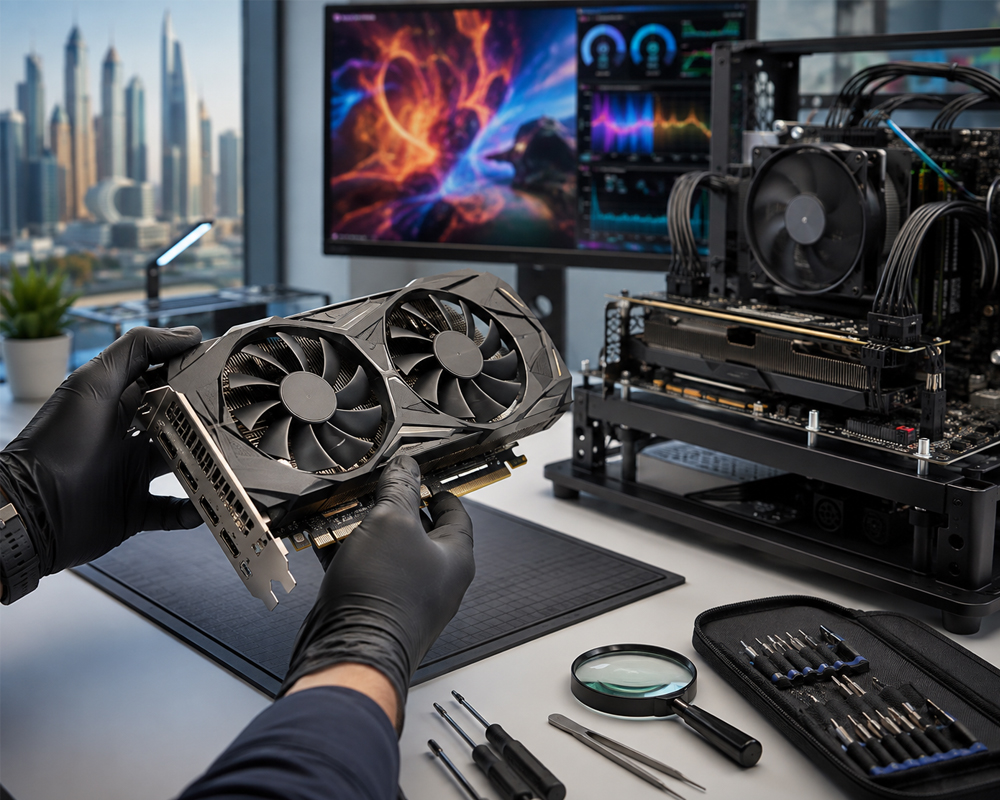
Your graphics card and storage also play massive roles. Always aim for a GPU with a triple-fan shroud. Larger heatsinks and more fan surface area mean each individual fan can spin slower while moving the same amount of heat. For storage, the choice is simple: ditch the mechanical hard drives. The “crunching” sound of a spinning HDD is impossible to hide in a quiet room. NVMe SSDs have no moving parts, generate less heat, and are completely silent. It’s an easy win for both speed and silence.
Fans: PWM vs. DC Control
Precision is everything when it comes to fan noise. Always choose 4-pin PWM fans for your build. These allow your motherboard to control speeds with surgical precision through the BIOS. Unlike older DC fans that require a high starting voltage, PWM fans can spin at ultra-low RPMs during idle tasks. If your case supports them, use 140mm fans instead of 120mm versions. Larger blades move more air at lower speeds, which significantly reduces that high-pitched whirring sound. This guide to building a quiet PC notes that static pressure fans are often quieter when pushing air through thick UAE dust filters because they don’t struggle as much as high-airflow models.
The Silent PSU Advantage
Your power supply is often the loudest hidden culprit in a noisy PC. Look for a unit with an 80 PLUS Gold or Platinum efficiency rating. Higher efficiency means less power is wasted as heat, which keeps the internal PSU fan from kicking in. A “Zero RPM” mode is a non-negotiable feature for a silent build. This keeps the fan completely still during web browsing or light work. A pro tip for the UAE market is to over-spec your wattage. If your system only needs 500W, using an 850W PSU ensures you stay within the fanless operating window for much longer, even during gaming. If you’re unsure which unit fits your budget, our experts can help you pick the right Pre-built PC UAE configuration that prioritizes these silent power standards.
Air vs. Liquid Cooling in the UAE Climate
Choosing between air and liquid cooling is the biggest decision you’ll make for your rig’s acoustics. In our region, this choice is about more than just aesthetics. It’s about how your machine handles the thermal load of a Dubai summer without sounding like a turbine. Effective gaming pc noise reduction uae depends on matching your cooling method to your specific hardware and room environment. While liquid cooling looks sleek, it isn’t always the quietest option for every user. You need to consider the specific frequencies of the sounds these systems produce.
Air cooling relies on massive metal heat sinks and high-quality fans to dissipate heat. It’s a reliable, mechanical solution with fewer points of failure. Liquid cooling uses a pump to move coolant to a radiator, where fans then blow the heat away. Both have unique acoustic profiles. Fans produce a low-frequency whoosh, while pumps often emit a high-pitched hum or whine. Most people find a steady fan sound much easier to ignore than the persistent, mechanical buzzing of a liquid pump. If you’re sensitive to high frequencies, a big air tower is your best friend.
When to Choose High-End Air Towers
A massive air cooler is often quieter than a small 120mm or 240mm AIO. These towers have a huge surface area, allowing them to soak up heat without needing high fan speeds. We use this strategy in The Beast Gaming System to ensure absolute silence under load. The lack of moving parts besides the fans makes it a superior long-term silence strategy. There’s no pump to fail or air bubbles to crackle over time. The noise floor of a high-end air cooler is essentially the lowest speed of its fans, which is often completely inaudible in a typical room.
AIO Liquid Cooling for High-TDP Builds
If you’re running a top-tier CPU that pulls massive power, an All-In-One (AIO) liquid cooler is hard to beat for raw thermal management. To keep it quiet, you must optimize your fan curves. Don’t let the fans pulse up and down every time you open a browser tab. Set a flat curve for lower temperatures to maintain a consistent acoustic profile. Radiator placement matters too. Mounting your radiator at the top of the case usually reduces turbulence and prevents air bubbles from getting trapped in the pump, which is a common cause of clicking noises. You can also manage pump speed directly in your BIOS. Running a pump at 70% instead of 100% often eliminates high-pitched whine without any measurable impact on your temperatures. Just remember that radiators have very tight fins. UAE dust can clog these quickly, forcing fans to spin faster to push air through. Clean your radiator every month to keep your gaming pc noise reduction uae goals on track.
Software Tuning and Physical Dampening Hacks
You don’t always need to buy new hardware to get a quiet rig. Sometimes the best gaming pc noise reduction uae comes from the software already on your drive. Software tuning is essentially free performance. It allows you to take control of your hardware instead of letting factory settings dictate the noise levels. Beyond software, small physical tweaks like using rubber gaskets or anti-vibration mounts for your case fans can kill those annoying rattles that thin metal panels often produce. These budget-friendly hacks are essential for anyone building in a region where heat usually demands high fan speeds.
Don’t fall for the “open air” myth. Many think taking the side panel off helps cooling and noise. It’s actually the opposite. A closed case acts as a sound barrier. It also ensures your fans can create directed airflow, which is vital for pushing heat out in the UAE climate. Keep that panel shut. Focus on your internal settings instead. A sealed case with optimized airflow will always be quieter than an open chassis that lets every fan whir and coil whine bleed directly into your room.
The Power of Undervolting
Undervolting is the ultimate secret for UAE gamers. You’re simply telling your components to run at their target speeds using less electricity. Less power means less heat, which directly translates to slower, quieter fans. For your GPU, download MSI Afterburner. Open the voltage curve editor and flatten the top end. This prevents your card from drawing unnecessary power during intense gaming sessions. For your CPU, look into your BIOS settings or use manufacturer tools like Intel XTU or AMD Ryzen Master. Always test for stability by running a heavy benchmark for 30 minutes. If it doesn’t crash, you’ve just gained a cooler, quieter system for zero Dirhams.
Advanced Fan Control Software
Move beyond the basic BIOS fan settings. Use an open-source tool like “Fan Control” to take total command of your acoustics. This software lets you sync your case fans with your GPU temperature, which most motherboards can’t do natively. One of the best features is “Hysteresis.” This setting tells your fans to wait a few seconds before changing speed. It prevents that annoying “revving” sound when your temperatures fluctuate slightly. You can also create specific profiles. Set a “Work” profile where fans stay at a dead-silent RPM and a “Gaming” profile for when you need maximum cooling. If you want a system that comes pre-optimized with these pro-level settings, check out The Budget King PC Build for a rig that balances power and peace.
Budget Gamer UAE: Silent Builds Without the Premium Price
We believe silence is a right, not a luxury. You shouldn’t have to pay a massive premium just to hear your game’s footsteps over your fans. Our team specializes in gaming pc noise reduction uae by selecting high-value parts that punch above their weight in thermal efficiency. We don’t just slap parts together. We curate each configuration to ensure your system stays quiet even during a marathon session in the middle of August. It’s about smart engineering, not just expensive branding.
Take The Budget King PC Build as a prime example. We optimize this system by using high-static pressure fans and precision-tuned BIOS profiles right out of the box. For our Pre-owned Gaming PCs, we go even further. Every used rig undergoes a total acoustic restoration. We replace old thermal paste with high-conductivity compounds and deep-clean fan bearings to ensure they run as quietly as the day they were first unboxed. This level of care ensures professional performance is attainable for every local enthusiast.
Professional assembly is our secret weapon against noise. Clean cable management isn’t just about looking good for social media. It’s a functional requirement for a silent PC. By clearing the path for air to flow directly from the intake to the exhaust, we prevent “hot pockets” from forming inside your case. This allows your fans to run at lower, more consistent speeds, eliminating the annoying revving sounds caused by obstructed airflow. A well-organized interior is the fastest way to lower your decibel levels without buying a single extra part.
Optimised Airflow for National Conditions
We design our systems with a “Positive Pressure” setup. This means we have more air coming in through filtered intakes than going out. It’s the best way to keep fine UAE dust from seeping into every crack and unbalancing your fans. Every system, from the Pro Gaming PC to The Beast Gaming System, undergoes rigorous stress-testing. We push the hardware to its limits to ensure the acoustic profile remains stable under the heaviest loads. You’ll receive your PC with custom fan curve pre-sets already loaded, so you can enjoy silent performance from the first boot.
Get Your Silent Rig Today
You don’t have to wait to upgrade your experience. We offer flexible payment options to make high-end silence accessible to everyone. You can build your silent PC now and pay later with Tabby UAE, enjoying interest-free installments. We provide national delivery across all Emirates and local support from experts who understand the unique challenges of gaming in the region. Stop settling for a loud, distracting rig. Upgrade to a Silent Performance Build Today and experience your games the way they were meant to be heard.
Master Your Silent Setup Today
Silence in the desert is a thermal challenge, but it’s one you can win. You’ve learned how to combat UAE heat with smart airflow, precise undervolting, and the right component choices. Effective gaming pc noise reduction uae isn’t just about turning down fan speeds; it’s about optimizing your entire system to handle high ambient temperatures without the acoustic penalty. By focusing on 4-pin PWM control and climate-ready configurations, you can keep your focus on the game instead of a roaring fan.
We’re ready to help you build that perfect, stealthy rig. Every system we build undergoes expert thermal testing to ensure it survives the local climate. You can even split the cost with interest-free installments through Tabby. Our specialized UAE climate-ready configurations mean you don’t have to compromise on power or peace. Browse our noise-optimised Gaming PC builds at Budget Gamer UAE and take the first step toward a quieter, more professional setup. You deserve a high-performance experience that stays cool and quiet under pressure. Let’s build your dream rig together.
Frequently Asked Questions
Is liquid cooling always quieter than air cooling for gaming PCs?
Liquid cooling is not always quieter than air cooling. While liquid systems handle heat spikes efficiently, they introduce a mechanical pump hum that remains constant. High-end air towers often provide a lower noise floor because they lack this mechanical whine. If you are sensitive to high-pitched frequencies, a massive air cooler with high-quality fans is usually the stealthier choice for your setup.
How much noise should a gaming PC make under full load?
A well-optimized gaming PC should ideally stay between 35 and 45 decibels under full load. This is roughly equivalent to a quiet library or a soft hum. If your rig sounds like a jet engine or exceeds 50 decibels, you likely have an issue with thermal throttling or poorly configured fan curves. Professional builds focus on maintaining a steady, low-frequency sound that blends into the background.
Can I use soundproofing foam inside my budget gaming case?
You should generally avoid using soundproofing foam in the UAE. While foam can dampen some noise, it also acts as a thermal insulator and traps heat inside your chassis. In our hot climate, this forces your fans to spin much faster to prevent overheating. Achieving effective gaming pc noise reduction uae is better done through high-airflow mesh panels that keep internal temperatures low and fan speeds minimal.
Does undervolting my GPU void the warranty in the UAE?
Undervolting your GPU typically does not void your warranty. It is a safe, software-level adjustment that reduces power consumption and heat. Most manufacturers only void warranties for physical modifications or overvolting that causes electrical damage. Since undervolting actually protects your hardware by lowering thermal stress, it is a highly recommended practice for gamers in the region looking for a quieter experience.
Why does my PC get louder during the summer months in the UAE?
Your PC gets louder in the summer because high ambient temperatures reduce cooling efficiency. When the air coming into your case is warmer, your fans must spin at significantly higher RPMs to move the same amount of heat away from your components. This increased speed creates more turbulence and mechanical noise. Maintaining a cool room environment is the first step to keeping those decibels down.
What is the best fan speed for a quiet gaming experience?
The sweet spot for most 120mm fans is between 800 and 1,200 RPM. At these speeds, you get enough static pressure to move air through filters without creating the high-pitched “whoosh” associated with maximum speeds. For 140mm fans, you can often drop as low as 600 to 900 RPM. Using PWM control allows your system to stay in these silent zones during most gaming sessions.
How often should I clean my PC to keep it quiet?
You should clean your PC every three to four months to maintain silent performance. Fine UAE dust accumulates quickly on fan blades and heat sinks, which unbalances the fans and forces them to work harder. This buildup increases friction in the bearings and creates a grinding noise over time. A quick blast of compressed air on your intakes and radiators will keep your acoustics at factory levels.
Are silent fans worth the extra cost for a budget build?
Investing in silent PWM fans is one of the most cost-effective upgrades you can make. Even for a Budget King PC Build, swapping out loud stock fans for high-quality, pressure-optimised models makes a massive difference. These fans move more air at lower decibels, providing a premium experience without a premium price tag. It is a smart way to achieve professional gaming pc noise reduction uae on a limited budget.