Blog
Essential Drivers for New Gaming PC 2026: The Ultimate UAE Setup Guide

Why did you invest thousands of Dirhams into a high-end rig just to let outdated software bottleneck your frame rates? It’s a common frustration for gamers across the Emirates. You finally unbox a powerful new machine, but the fear of installing system-slowing bloatware or missing a critical update is real. Finding the essential drivers for new gaming pc uae shouldn’t feel like a chore. You want a setup that’s optimized for the local climate and ready for competitive play without the clutter.
We agree that your focus should be on the game, not on troubleshooting. This guide promises to unlock the full potential of your new rig with a definitive list of performance tools and must-have utilities for 2026. You’ll learn how to achieve a lightning-fast, organized desktop environment with stable frame rates while keeping your hardware safe from the heat.
We’ll provide a clear preview of the latest June 2026 updates, including the new Nvidia App version 610.47 and the Windows 11 25H2 security patches. We’re cutting through the noise to ensure your PC stays ice-cold and performs at a professional level from the very first boot.
Key Takeaways
- Identify and install the latest essential drivers for new gaming pc uae to secure maximum stability and hardware compatibility.
- Master thermal monitoring with tools like MSI Afterburner to prevent performance throttling during the peak UAE summer.
- Consolidate your entire game library from Steam and Epic Games into a single, organized interface for faster access.
- Optimize your system speed by choosing lightweight security and compression utilities that won’t drain your CPU resources.
- Tailor your software environment to your hardware, whether you’re maximizing frames on a Budget King or multitasking on the Beast Gaming System.
The First Boot Checklist: Essential Drivers and OS Optimization
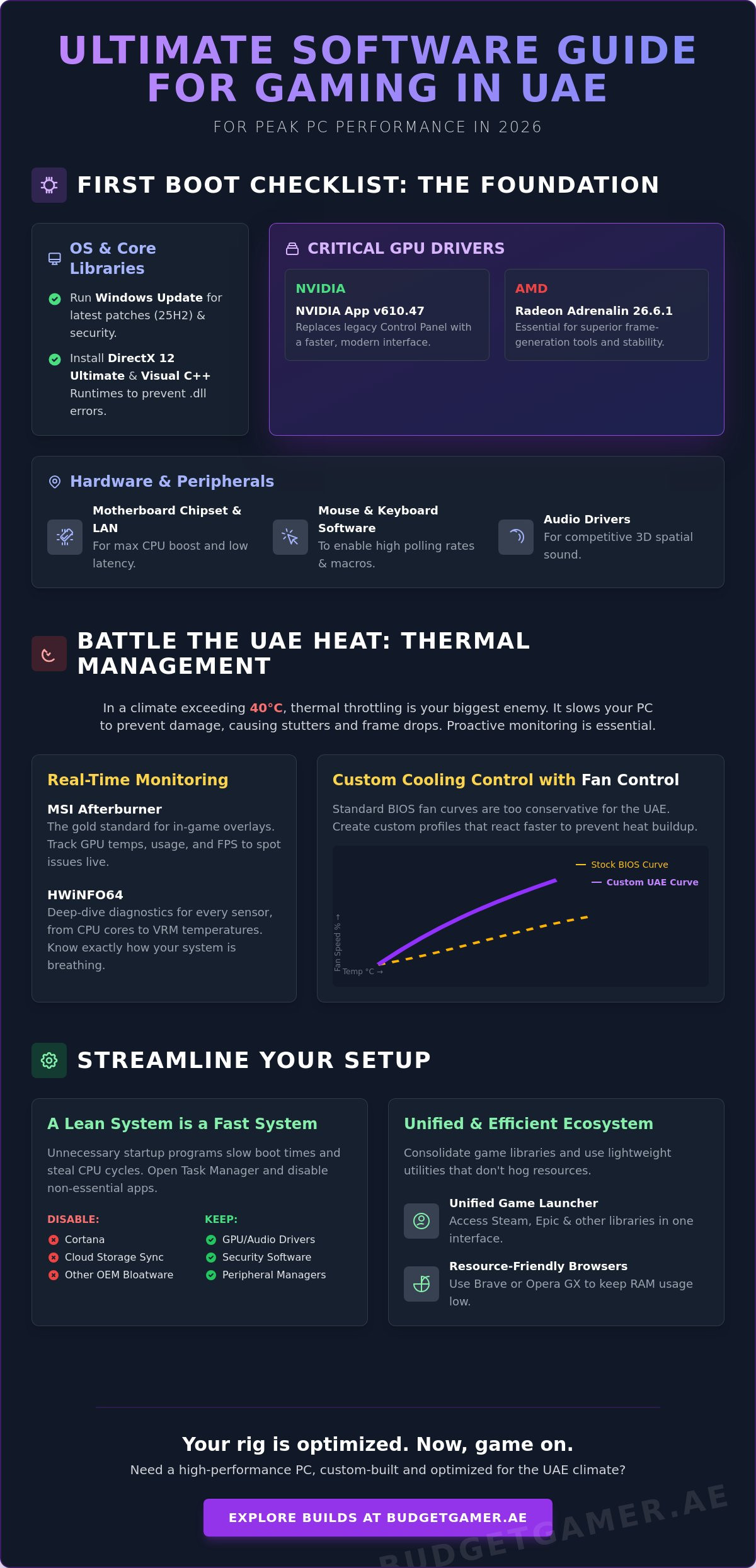
Your journey to a perfect gaming experience starts the moment you hit the power button. Don’t rush into downloading games just yet. The foundation of every stable system is a fully updated Operating System. Running Windows Update immediately ensures you have the latest security patches and DirectX 12 Ultimate components. This isn’t just about safety; it’s about performance. Modern titles in 2026 rely on OS-level optimizations to manage high-speed NVMe storage and CPU scheduling effectively.
Managing your GPU software is the next critical step for your hardware. Most modern dedicated graphics cards from NVIDIA and AMD require specialized software to communicate with your OS. For NVIDIA users, the new NVIDIA App (version 610.47) has officially replaced the legacy Control Panel, offering a much faster interface. AMD owners should stick with Radeon Adrenalin 26.6.1 for its superior frame-gen tools. Installing these essential drivers for new gaming pc uae ensures your card runs at its advertised clock speeds without crashing during intense matches.
Never ignore your motherboard chipset drivers. These small files act as the traffic controllers for your CPU, RAM, and PCIe slots. Without them, your processor might not boost to its maximum frequency, or your USB ports could suffer from latency. Visit your motherboard manufacturer’s site to grab the latest chipset and LAN drivers. Finally, keep your boot times under 10 seconds by opening Task Manager and disabling unnecessary startup apps like Cortana or pre-installed cloud storage tools. A lean system is a fast system.
Automating Your Initial Setup
Skip the hassle of downloading twenty different installers. Use Ninite to bulk-install your browser, media players, and chat tools in one go. It’s clean, fast, and skips all the hidden bloatware. Choose a browser like Brave or Opera GX to keep RAM usage low while you game. For a truly professional feel, disable Windows 11 telemetry and background tracking. This frees up CPU cycles for your games and keeps your data private.
Essential Hardware Drivers
Games won’t even launch without the right libraries. Ensure you have the latest Visual C++ Redistributables and DirectX runtime components installed. These are the “hidden” essential drivers for new gaming pc uae that prevent those annoying .dll errors. Don’t forget your peripherals. Download the specific software for your mouse and keyboard to set up high-polling rates and custom macros. Lastly, configure your audio drivers for spatial sound. Proper 3D audio settings give you a massive competitive edge by letting you hear footsteps before you see the enemy.
Performance Monitoring and Thermal Management in UAE
Gaming in the UAE presents a unique challenge: the heat. While your components are powerful, they are also sensitive to ambient temperatures that often exceed 40 degrees Celsius. Thermal throttling occurs when your CPU or GPU reaches its safety limit and automatically slows down to prevent permanent damage. This leads to stuttering and massive frame rate drops. Monitoring your hardware isn’t just an enthusiast hobby; it’s a necessity for system longevity in this climate. You need to know exactly how your hardware is breathing when the room temperature rises.
MSI Afterburner remains the gold standard for in-game overlays in 2026. Many users think it’s only for overclocking, but its true value lies in real-time visibility. You can see exactly how hot your GPU is running during a session of the latest AAA titles. Pairing this with HWiNFO64 gives you a deep-dive diagnostic of every sensor in your rig. It tracks everything from VRM temperatures to individual core heat. These tools are just as vital as the essential drivers for new gaming pc uae you installed during your initial setup. Keeping your hardware within safe limits is the best way to protect your investment, especially if you’re pushing a high-performance gaming PC to its limits.
Fan Control is another must-have utility for 2026. Standard BIOS fan curves are often too conservative for the Middle Eastern climate. This software allows you to create custom airflow profiles that respond to multiple temperature sensors simultaneously. It’s a precise way to manage noise while ensuring your intake fans ramp up before the heat becomes a problem. A well-configured fan curve can be the difference between a stable gaming session and a sudden system shutdown.
Tracking Your FPS and Temps
Set up an unobtrusive in-game overlay to keep an eye on your performance metrics without distracting from the action. This allows you to identify bottlenecks before they crash your session. If you notice your GPU usage is at 99% while temps hit 85 degrees, it’s time to adjust your settings. Always run a baseline benchmark using 3DMark or Cinebench when you first get your system. These scores act as a reference point for future troubleshooting and help you verify that your cooling is working as intended.
Advanced Cooling Control
Software-based fan curves beat BIOS defaults because they offer more granular control and faster response times. Don’t forget to monitor your SSD health as well. High-speed Gen5 drives can run surprisingly hot in 2026, and excessive heat can lead to data loss or drive failure. Set up automated alerts to notify you if any component crosses a specific thermal threshold. This proactive approach ensures your system stays ice-cold even during intense 4K gaming sessions in the middle of a UAE summer.
The 2026 Gaming Ecosystem: Launchers and Social Tools
Your hardware is ready, but the software landscape in 2026 is more fragmented than ever. You aren’t just using one platform to launch your games. You’re likely juggling Steam for its community features, the Epic Games Store for weekly freebies, and PC Game Pass for its incredible library of titles. Each of these launchers brings its own background services. If you don’t manage them properly, they’ll compete for your CPU cycles and RAM. Managing this ecosystem is just as vital as installing the initial essential drivers for new gaming pc uae to ensure your system remains snappy and responsive.
Playnite is the ultimate pro-tip for the modern gamer. It’s an open-source library manager that consolidates every game from every platform into a single, unified interface. It’s lightweight, fast, and removes the need to have five different windows open at once. For UAE gamers who value efficiency, it’s the best way to keep your desktop clean. Beyond organization, pay close attention to your cloud save settings across these platforms. There’s nothing worse than losing hours of progress because a sync failed while you were switching between your main rig and a portable device. Double-checking these settings during your first week ensures your data is always safe.
Social tools have also evolved. Discord remains the king of communication, but its modern version can be resource-heavy. Optimizing your social apps is a key step in maintaining peak performance. You want to stay connected with your squad without sacrificing a single frame. In the UAE, discovering local gaming communities and titles with dedicated servers operating within the country is the secret to low-latency play. Lower ping means faster reactions, giving you a tangible edge in competitive matches.
Library Management Made Easy
- Consolidate everything: Use Playnite to pull games from Steam, Epic, and Xbox into one dashboard.
- Drive management: Direct your massive 2026 titles to your fastest NVMe drives while keeping older games on secondary storage.
- Couch gaming: Set up Big Picture mode or a unified controller interface for a seamless experience on your living room 4K TV.
Voice and Social Essentials
Discord optimization is mandatory for high-performance builds. Disable Hardware Acceleration and the in-game overlay if you notice any stuttering during gameplay. These small tweaks free up your GPU to focus entirely on rendering. For those who stream or record, OBS Studio is the standard for 2026. Use the latest AV1 encoders supported by your hardware to capture high-quality footage with minimal impact on your FPS. It’s about having the best social experience without the performance tax.
Daily Driver Utilities: Productivity and Security Without the Slowdown
You’ve already optimized your hardware and set up your gaming environment. Now, it’s time to talk about the tools you use every day. Many gamers make the mistake of installing massive, resource-heavy software suites that eat into their performance. Don’t let your PC become sluggish after just a few months. Choosing lightweight, efficient utilities is the final step in maintaining the work you did when installing the essential drivers for new gaming pc uae. A clean system isn’t just about speed; it’s about reliability and a frustration-free experience.
Security is often the biggest source of system bloat. In 2026, you don’t need a heavy, third-party antivirus suite that constantly scans in the background and kills your frame rates. Windows Defender has evolved into a powerhouse that provides excellent protection with almost zero impact on gaming. Pair it with a robust password manager like Bitwarden. Securing your Steam, Epic, and Discord accounts with unique, complex passwords and multi-factor authentication is far more effective than any paid antivirus software. It keeps your digital life safe without stealing a single CPU cycle.
For your media and file needs, stick to the classics. 7-Zip is the superior choice over WinRAR for 2026 gamers. It’s open-source, completely free, and handles every archive format without annoying pop-ups. When it comes to video, VLC Media Player remains the only tool you’ll ever need. It plays every file type imaginable and uses hardware acceleration to keep things smooth. If you’re looking to upgrade your setup or need a machine that handles these tasks with ease, check out a Pro Gaming PC designed for both speed and efficiency.
Maintenance and Cleaning
Keep your SSD lean and fast. Standard uninstallers often leave behind junk files and registry entries that can cause long-term degradation. Revo Uninstaller is a vital tool for removing software completely. It scans for leftover data and wipes it out. To visualize your storage, use WizTree. It shows you exactly what is eating your SSD space in seconds, allowing you to find massive temporary files or old game installs. Finally, automate your system backups to an external drive. A simple weekly mirror ensures you can recover from a drive failure without losing your custom configurations.
Productivity for Gamers
Productivity shouldn’t come at the cost of performance. Use lightweight PDF readers like SumatraPDF instead of heavy alternatives that hog your RAM. Your eyes also need protection during those late-night sessions. Enable the built-in Windows Night Light or use Flux to reduce blue light strain. This is especially important in the UAE, where we often spend long hours indoors. Keep a simple note-taking app like Notepad++ or Obsidian handy for logging your custom build specs, game strategies, or driver version history. It’s about being a savvy, organized gamer.
Optimizing Your Budget Gamer UAE Build
Your software stack should match your hardware’s muscle. Optimization isn’t a one-size-fits-all game. A system built for 1080p value requires a different approach than a 4K powerhouse. Once you’ve handled the essential drivers for new gaming pc uae, it’s time to refine your profile. We want you to get exactly what you paid for. No lag. No wasted resources. Just pure performance. The goal is to make professional-level stability an attainable reality for every gamer in the Emirates.
Tailoring Software to Your System
If you’re rocking The Budget King PC Build, efficiency is your best friend. Every megabyte of RAM matters. Stick to lightweight alternatives for everything. Use Windows ‘Game Mode’ to prioritize your processor’s focus. Avoid heavy overlays that eat into your frame budget. This lean setup ensures you hit those 60+ FPS targets in competitive titles without breaking the bank. It’s about economic efficiency meeting high-speed results.
On the other end, Ultra High-End PCs and the Beast Gaming System thrive on multitasking. You have the cores; use them. Software like Process Lasso helps you pin specific games to your fastest cores. This prevents background streaming tasks from causing micro-stutter. It’s the savvy way to manage a high-tier rig in 2026. For those looking at Pre-owned Gaming PCs, hardware verification is vital. Run OCCT for at least an hour to stress test the power supply and CPU. Use CrystalDiskInfo to check the remaining life on used SSDs. These steps ensure your rig won’t fail you during a desert summer heatwave.
Next Steps with Budget Gamer UAE
Ready to level up? You don’t have to do it alone. Our team provides expert support to ensure your custom build software is perfectly tuned. Join our local gaming community to swap tips with other enthusiasts across the Emirates. We believe every enthusiast deserves a high-quality experience without the risk of overspending. If you’re looking to add more storage or a better GPU, remember you can use Tabby UAE to split your costs into interest-free installments. It’s the smartest way to keep your rig at the cutting edge. Get out there and start playing.
Claim Your Competitive Edge Today
You now have the blueprint for a perfect 2026 setup. By focusing on a clean OS foundation, mastering thermal monitoring for the UAE climate, and consolidating your library, you’ve transformed your hardware into a high-performance weapon. Identifying and installing the essential drivers for new gaming pc uae is just the beginning of your journey. It ensures your system remains fast, stable, and ready for any challenge the lobby throws at you.
We’re here to help you maintain that edge. Whether you need expert national support to fine-tune your settings or you’re looking for tiered builds for every budget, our team has you covered. We even offer certified pre-owned reliability for those who want maximum value without the risk. Don’t let your performance be an afterthought when professional-level gaming is within your reach. It’s time to stop troubleshooting and start winning.
Ready for a rig that handles it all? Explore the Budget King and Beast systems at Budget Gamer UAE
The arena is waiting. Grab your gear, update your drivers, and start your next session with total confidence. Your perfect gaming experience starts now.
Frequently Asked Questions
Do I really need to install third-party antivirus on a new gaming PC in 2026?
No, you don’t need a heavy third-party antivirus suite. Windows Defender has evolved into a powerhouse that provides top-tier protection without stealing your CPU cycles. Stick with the built-in security and use a password manager like Bitwarden to keep your accounts safe and your system fast.
What is the best way to monitor my PC temperatures in the UAE summer?
MSI Afterburner and HWiNFO64 are the best tools for tracking heat. Use the in-game overlay in Afterburner to watch your GPU temps in real-time while you play. This is vital during the UAE summer to ensure your components don’t hit thermal limits and start throttling your performance.
Which browser uses the least amount of RAM for gaming in the background?
Brave and Opera GX are the most efficient choices for gamers. These browsers allow you to limit resource consumption or naturally use less memory than traditional options. This ensures you can keep your guides or Discord open without causing lag in your main game window.
How do I remove pre-installed bloatware from Windows 11?
Use Revo Uninstaller to completely wipe out unwanted apps and their leftover registry files. You can also go into Windows Settings and manually disable background apps. This keeps your system lean and helps maintain boot times under 10 seconds for a professional-level experience.
Should I use a game booster software to increase my FPS?
Skip the third-party game boosters as they often act like bloatware themselves. The built-in Windows Game Mode is already optimized to prioritize your gaming tasks. It handles CPU scheduling effectively without the need for extra background processes that might actually slow you down.
Is it safe to use Ninite for all my basic software needs?
Yes, Ninite is a safe and highly efficient tool for bulk-installing essential drivers for new gaming pc uae. It automatically rejects bundled junkware and toolbars that often come with individual installers. It’s the fastest way to get your new rig ready for action with a clean desktop.
How often should I update my GPU drivers for maximum stability?
Update your graphics drivers once a month or whenever a major new game title launches. Use the NVIDIA App or AMD Adrenalin to stay current with the latest optimizations for 2026 titles. Keeping your essential drivers for new gaming pc uae updated ensures you have the latest bug fixes and performance tweaks.
What software do I need to manage RGB lighting on my custom build?
OpenRGB or SignalRGB are the best choices for managing all your lighting in one place. These universal tools prevent you from needing five different brand-specific apps running at once. It’s a savvy way to keep your system organized while maintaining a clean, professional aesthetic for your build.