
Blog
Air Cooling vs Liquid Cooling: Which Is Better for Gaming PCs?

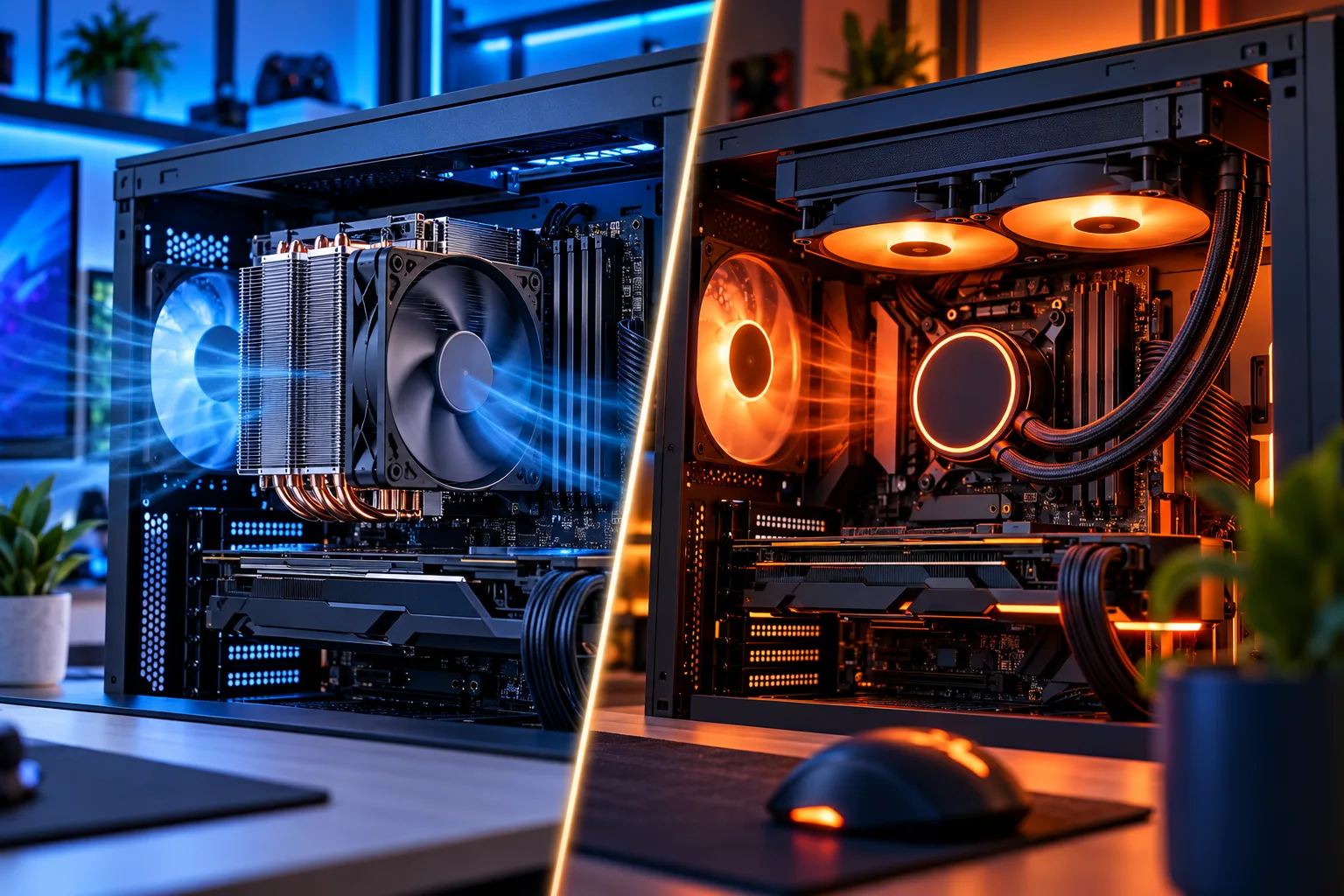
Choosing the right CPU cooler can affect temperatures, noise, reliability, and the overall cost of your gaming PC. For UAE gamers, cooling deserves even more attention because high ambient temperatures and dust can make poorly ventilated systems run hotter over time.
The two main options are air cooling and liquid cooling, usually in the form of an AIO cooler. Both can work extremely well when matched with the right processor and case.
The important question is not simply which cooling method produces lower temperatures. You need to consider your CPU, gaming workload, case airflow, budget, noise expectations, maintenance, and whether spending extra on cooling actually improves your gaming experience.
Here is how air cooling and liquid cooling compare for gaming PCs in 2026.
Air Cooling vs Liquid Cooling: Quick Comparison
| Feature | Air Cooling | AIO Liquid Cooling |
|---|---|---|
| Initial Cost | Lower | Higher |
| Installation | Easier | More involved |
| Maintenance | Very low | Low |
| Reliability | Excellent | Very good |
| Budget Builds | Excellent | Usually unnecessary |
| Mid-Range Builds | Excellent | Optional |
| High-Power CPUs | Good with large coolers | Excellent |
| Case Space | Needs CPU cooler clearance | Needs radiator space |
| Appearance | Traditional | Cleaner/premium |
| Pump | No | Yes |
Neither option automatically makes a gaming PC better. The correct choice depends on the hardware you are trying to cool.
How Does Air Cooling Work?
An air cooler sits directly on top of the processor.
Heat moves from the CPU into the cooler’s metal base and heat pipes before being distributed through a large heatsink. One or more fans then move air across those fins and carry the heat toward the case exhaust.
Modern tower air coolers can handle many mainstream gaming processors comfortably.
Their biggest advantage is simplicity. There is no pump, radiator, or liquid loop. Apart from cleaning dust and eventually replacing a fan if required, there is relatively little to maintain.
That makes air cooling particularly attractive for affordable and mid-range gaming PCs.
How Does Liquid Cooling Work?
Most gaming PCs that use liquid cooling rely on an AIO, or All-in-One liquid cooler.
A cold plate sits over the CPU while coolant moves heat toward a radiator. Fans mounted to that radiator then remove the heat.
Common radiator sizes include 240mm, 280mm, and 360mm, although exact compatibility depends on the case.
Larger AIOs can provide strong cooling capacity for high-power processors, especially during sustained CPU-heavy workloads.
However, an AIO includes additional components such as a pump, tubing, radiator, and multiple fans, making it more complex than a traditional tower cooler.
Is Air Cooling Enough for Gaming?
For most gaming PCs, yes.
A modern Ryzen 5, Ryzen 7, or Core i5-class gaming system usually does not require an expensive 360mm liquid cooler simply to play games.
A quality tower cooler combined with a well-ventilated case can provide excellent results.
This is particularly important for budget builds because spending an extra few hundred dirhams on unnecessary cooling may reduce the amount available for the graphics card, CPU, RAM, or SSD.
If your goal is maximum gaming performance for the money, read Best Budget Gaming PC in UAE 2026: Complete Buying Guide before allocating too much of your budget to cooling.
When Does Liquid Cooling Make More Sense?
Liquid cooling becomes easier to justify when the processor produces more heat or regularly handles sustained heavy workloads.
A high-end gaming PC may also be used for streaming, video editing, rendering, development work, and other CPU-intensive tasks.
In these situations, a larger AIO can provide additional thermal headroom.
Liquid cooling can also make sense when aesthetics are important. An AIO leaves less visual mass around the CPU socket and can create a cleaner-looking build.
Still, you should never buy liquid cooling purely because the computer is advertised as “high-end.” Match the cooler to the actual CPU and workload.
Does Liquid Cooling Give More Gaming FPS?
Usually not by itself.
If both cooling systems keep the processor within its intended operating temperatures, changing from a capable air cooler to an expensive AIO may produce little noticeable gaming improvement.
Cooling becomes performance-related when an inadequate cooler causes the CPU to reduce clock speeds under sustained heat.
The better strategy is to buy enough cooling for your processor rather than the most expensive cooling system available.
For players targeting very high frame rates, see High FPS Gaming PC Build UAE: The 2026 Guide to Maximum Performance for a broader look at CPU, GPU, cooling, and system balance.
Which Cooling Method Is More Reliable?
Air cooling has an advantage in mechanical simplicity.
A tower cooler mainly consists of a heatsink and fans. If a fan eventually fails, it can often be replaced without replacing the entire cooler.
An AIO adds a pump to the cooling system. Pumps are designed for long-term operation, but they are still an additional mechanical component.
This does not mean modern AIO coolers are unreliable. Quality units can operate successfully for years. However, gamers who prioritize simplicity and easy long-term maintenance may prefer air cooling.
Cooling and UAE Room Temperature
An important point is often overlooked: neither air nor liquid cooling can ignore ambient room temperature.
Both systems ultimately release heat into the surrounding air.
If your gaming room is properly air-conditioned, both cooling technologies have access to relatively cool intake air. If the surrounding room becomes very hot, component temperatures can increase regardless of whether you use an air cooler or AIO.
Good case airflow therefore remains essential.
A premium 360mm AIO inside a case with restricted intake airflow can perform worse than expected.
Case Airflow Is Just as Important
Before spending heavily on a CPU cooler, check the case.
A gaming case should allow cool air to enter while warm air leaves efficiently. Mesh or highly ventilated front panels are particularly useful for performance-focused builds.
Your graphics card also depends heavily on case airflow. A CPU cooler does not solve poor GPU ventilation.
When upgrading an existing system, check Budget Gamer’s Gaming PC Upgrade Guide: Which Parts Should You Upgrade First? before assuming a new CPU cooler is the first component you need.
Dust Affects Both Air and Liquid Cooling
Air coolers and AIOs both move significant amounts of air through the computer.
Over time, dust can collect on filters, fan blades, heatsinks, and radiators. This restricts airflow and can make fans run faster and louder.
A liquid-cooled gaming PC is therefore not maintenance-free.
Its radiator still needs clean airflow.
Budget Gamer’s How Often Should You Clean Your Gaming PC in the UAE? explains how local dust conditions can affect maintenance schedules.
Which Cooling Is Better for a Budget Gaming PC?
For most affordable builds, air cooling offers better value.
Instead of paying for an expensive AIO, you can put more of the budget toward a stronger graphics card, larger SSD, better PSU, or higher-quality case.
For example, buyers comparing mainstream and performance-focused systems can browse pre-built gaming PCs from AED 4,000 to AED 7,500 and compare how CPU cooling changes as processor and GPU performance increases.
Do not assume the PC with the biggest radiator automatically provides better gaming value.
Which Cooling Is Better for High-End Gaming PCs?
Liquid cooling becomes more attractive in premium systems.
High-end processors can consume significantly more power under heavy workloads, making a quality 280mm or 360mm AIO easier to justify.
Enthusiasts may also prefer liquid cooling because it gives more room around the CPU socket and can fit the visual style of premium builds.
Large dual-tower air coolers can still be excellent, so liquid cooling is not mandatory even for every high-performance gaming system.
What About Noise?
Neither technology is automatically quieter.
A large air cooler with slow-running fans can be extremely quiet.
An AIO has radiator fans plus a pump, so its noise profile depends on the quality of those components and how aggressively they are configured.
Fan curves also matter. Running every fan at maximum speed creates unnecessary noise regardless of the cooling technology.
Good cooling is about maintaining safe temperatures without making the gaming PC sound like it is constantly under maximum load.
Installation and Compatibility
Air coolers require enough height inside the case and may interfere with very tall RAM modules.
AIO coolers require compatible radiator mounting locations. You also need enough clearance around the motherboard, GPU, and case fans.
Always check your case specifications before buying either type.
Buying a 360mm AIO and later discovering the case only accepts a 240mm radiator is an avoidable and expensive mistake.
Final Verdict: Air Cooling or Liquid Cooling?
For most budget and mid-range gaming PCs, air cooling is the better value. It is simple, dependable, affordable, and capable of cooling many mainstream gaming processors.
For premium gaming PCs with high-power CPUs, sustained workloads, or users who want additional thermal headroom and a cleaner visual style, AIO liquid cooling can be the better choice.
The most important factor is balance.
Do not install an expensive liquid cooler while compromising the GPU, power supply, or case airflow. At the same time, do not use an undersized air cooler on a processor that regularly handles heavy workloads.
Choose cooling based on the CPU you actually own, the work your PC performs, and the airflow available inside your case.
Frequently Asked Questions
Is air cooling enough for a gaming PC in the UAE?
Yes. A quality air cooler with a well-ventilated case is sufficient for many budget and mid-range gaming processors.
Is liquid cooling better than air cooling?
Liquid cooling can provide more thermal headroom for powerful CPUs, but air cooling often offers better value for mainstream gaming systems.
Does liquid cooling increase FPS?
Not necessarily. It mainly helps when inadequate cooling is preventing the CPU from maintaining normal performance.
Is liquid cooling necessary for Ryzen 5 or Core i5 gaming PCs?
Usually not. A good tower air cooler is generally enough for mainstream processors when properly matched to the CPU.
Is a 240mm AIO enough for gaming?
It can be sufficient for many processors. Higher-power CPUs may benefit from larger radiators depending on workload and power limits.
Is a 360mm AIO better than a 240mm AIO?
A larger radiator offers more cooling surface area, but that does not mean every processor needs it.
Which cooling system requires less maintenance?
Air cooling is generally simpler. Both air coolers and AIO radiators still need periodic dust cleaning.
Can liquid coolers leak?
A quality sealed AIO is designed to operate as a closed system, but it still contains more components than an air cooler and should be installed correctly.
Which cooling method is quieter?
Either can be quiet when properly sized and configured. Fan quality, pump noise, case airflow, and fan curves all influence total noise.
Should I spend more on cooling or my GPU?
For a budget gaming PC, first buy enough cooling for the CPU to operate properly. Additional budget usually has a greater gaming impact when invested in the GPU or other performance-critical components.